What are the features need to be enabled in IIS to run the Bold Reports® Application on Windows Server OS?
The Bold Reports® On-Premise Edition can be hosted in both IIS Express and IIS. To run Bold Reports® in IIS, enable IIS along with the required IIS features and roles.
NOTE: A pre-installed Bold Reports® Enterprise Edition and IIS configured Azure VM is available here.
Steps to enable the IIS and features that are needed to run the Bold Reports® Server in the Windows Server OS
-
Open
Server Managerand clickManage > Add Roles and Features. Click Next. -
Select
Role-based or feature-based installationand clickNext. -
Choose
Select a server from the server pooland select the server in the Server Pool section, and then clickNext. -
On
Server Roles, enable theWeb Server (IIS)in the Roles section. -
On
Features, enable the following .NET Framework features and clickNext.Note: You should use Microsoft .NET Framework 4.5 or higher version. Learn more here.
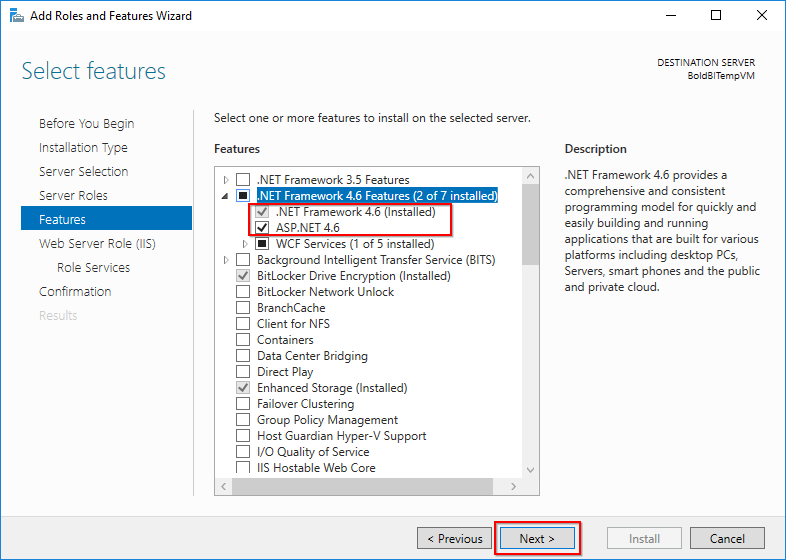
-
On the
Web Server Role (IIS)dialog box, click Next. -
On the
Select role servicesdialog box, verify that the required web server component listed here are enabled. Then, clickNext.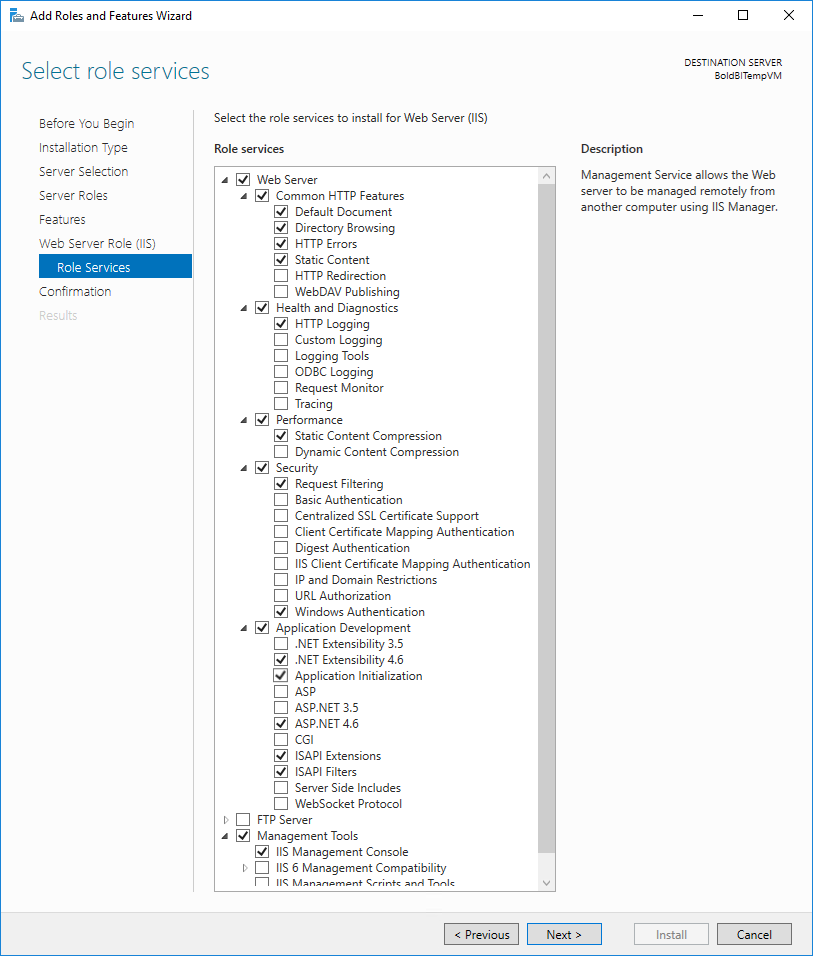
-
Verify that your settings are correct and click
Install. -
When the installation completes, click
Closeto exit the wizard.
Required web server components
The IIS components listed below satisfy the minimum requirements to run the Bold Reports®. If other IIS components are enabled, they do not need to be removed.
| Section | IIS Components |
|---|---|
| Web Server | Common HTTP Features
- Default Document - Directory Browsing - HTTP Errors - Static Content |
| Health and Diagnostics
- HTTP Logging |
|
| Performance Features
- Static Content Compression |
|
| Security
- Request Filtering - Windows Authentication |
|
| Application Development
- .NET Extensibility 4.6 - Application Initialization - ASP.NET 4.6 - ISAPI Extensions - ISAPI Filters |
|
| Management Tools | IIS Management Console |