What features need to be enabled in IIS to run the Bold Reports® Application on Windows Client OS?
The Bold Reports® On-Premise Edition can be hosted on both IIS Express and IIS. To run Bold Reports® on IIS, ensure that IIS is enabled and configured with the necessary features and roles.
Steps to enable IIS and features that are needed to run the Bold Report Server in the Windows Client OS:
-
Open
Control Paneland clickPrograms and Features > Turn Windows features on or off. -
Enable
Internet Information Services.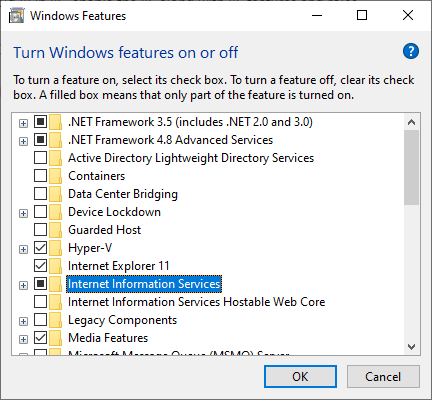
-
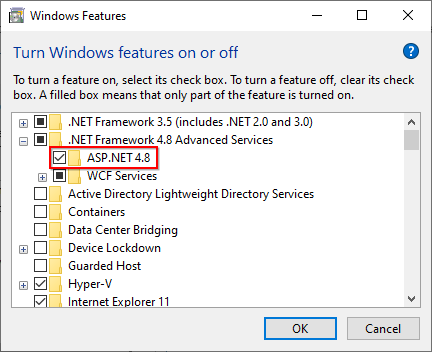
Expand the
.NET Framework 4.8 Advanced Servicesand enable the ASP.NET 4.8 feature.Note: You should use Microsoft .NET Framework 4.5 or higher version. Learn more here.
-
Expand the
Internet Information Servicesfeature and ensure that all the required IIS components listed here are selected. Then, clickOK.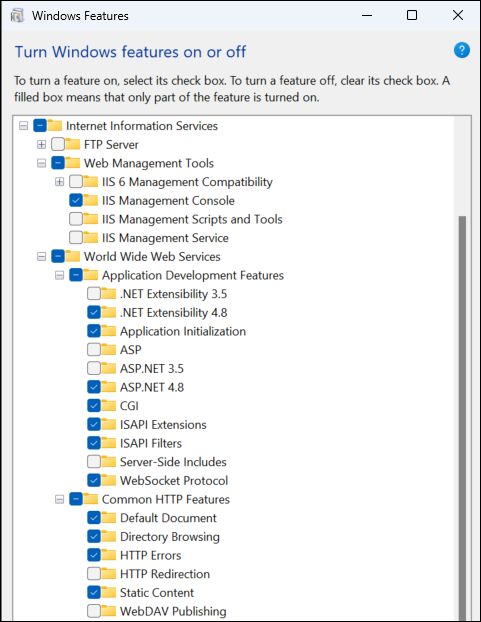
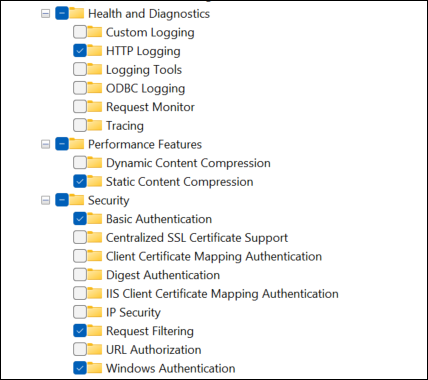
Required web server components
The IIS components listed below satisfy the minimum requirements to run the Bold Reports®. If other IIS components are enabled, they do not need to be removed.
| Section | IIS Components |
|---|---|
| World Wide Web Services | Common HTTP Features
- Default Document - Directory Browsing - HTTP Errors - Static Content |
| Health and Diagnostics
- HTTP Logging |
|
| Performance Features
- Static Content Compression |
|
| Security
- Request Filtering - Windows Authentication |
|
| Application Development
- .NET Extensibility 4.8 - Application Initialization - ASP.NET 4.8 - ISAPI Extensions - ISAPI Filters - WebSocket Protocol |
|
| Web Management Tools | IIS Management Console |