Configuring SSH Tunnel for Data Connectors
Bold Reports® Designer lets you connect data connectors to remote databases through an encrypted SSH tunnel. You can configure the tunnel with password or public key authentication.
What is SSH?
SSH (Secure Shell) is a network protocol that encrypts connections, so Bold Reports® can securely access remote databases through an SSH tunnel.
Bold Reports® supports various supported data connectors for SSH tunneling to connect the remote databases through an SSH tunnel.
Both the basic and advance panels support SSH configuration to establish a secure connection to your remote database.
How do I configure an SSH tunnel?
To configure an SSH tunnel in the Bold Reports® Designer, fill in the following SSH fields in the data source panel.
SSH Server Name: Specify the address of the SSH server (IP address or hostname).
SSH Port: Specify the port number used for SSH connection (default is 22, but this may vary).
SSH Username: Specify the username for SSH authentication.
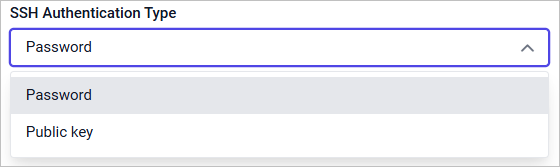
SSH Authentication Type: You can set authentication type, either as Password or Public key.
The following image shows the SSH Authentication Type selection dropdown.
How do I use password authentication?
If you use password authentication in the Bold Reports® Designer, select Password as the SSH Authentication Type. Then, specify the secure password associated with the SSH username.
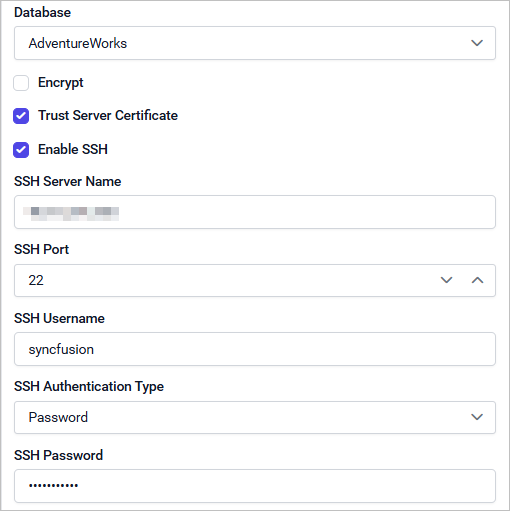
SSH Password: Specify the secure password for the SSH username (keep this confidential).
How do I use public key authentication?
If you use public key authentication in the Bold Reports® Designer, select Public key as the SSH Authentication Type. Upload your encrypted private key file and provide the associated passphrase.
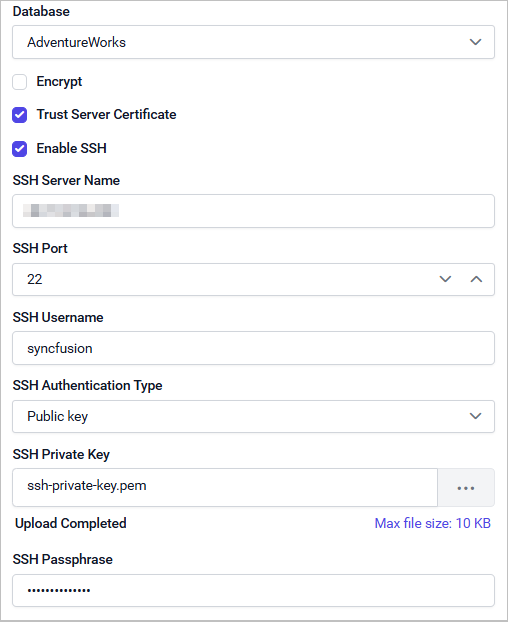
SSH Private Key: Upload your encrypted private key file for authentication (keep this confidential).
SSH Passphrase: Specify the passphrase required to decrypt your private key.
SSH Tunneling is not applicable in the Bold Reports® cloud version.
What are the technical requirements for SSH tunneling?
Bold Reports® SSH tunneling connections have the following private key requirements:
-
Only encrypted private key file in .pem format is allowed for SSH public key authentication.
-
Ensure your private key is encrypted with a passphrase before uploading it.
-
SSH supports .pem private keys in the following formats: RSA, DSA, ECDSA (256/384/521), and ED25519.
How do I keep SSH connections secure?
To keep Bold Reports® SSH tunnel connections secure, follow these practices:
-
Always keep your SSH credentials (username, password, private key, and passphrase) secure and accessible only to authorized users.
-
Use strong, complex SSH password and passphrase for private key encryption.
-
Limit SSH access to only required users, and restrict allowed IP address ranges at the SSH server whenever possible.
Refer to the
Public Key Authenticationsection in the SSH.NET NuGet package for more details.
How do I troubleshoot SSH tunnel errors?
Use the following checks when an SSH tunnel in the Bold Reports® Designer fails.
Private key upload failure:
- Double-check the private key file is in .pem format.
Authentication errors:
-
Verify your SSH server name, username and authentication type.
-
For password authentication, check for typos.
-
For public key authentication:
-
Ensure the private key file content starts with “-----BEGIN”.
-
Make sure the private key is encrypted with the proper passphrase.
-
Verify your SSH passphrase.
-
Cannot establish SSH tunnel (connection refused or timed out):
-
Double-check the SSH credentials. Make sure the server allows SSH connection from your network.
-
Ensure any firewalls or network policies permit outgoing SSH connection from the Bold Reports® Designer.
Supported Data Connectors
The following Bold Reports® data connectors support SSH tunneling connections:
- Microsoft SQL
- PostgreSQL
- MySQL
- MemSQL
- MariaDB
- CDATA
- Amazon Aurora
- Google cloud SQL (MySQL and PostgreSQL)
- Amazon RDS (Microsoft SQL, MySQL, MariaDB and PostgreSQL)
Frequently asked questions
Which SSH authentication types does Bold Reports® support?
Bold Reports® Designer supports Password and Public key as the SSH Authentication Type.
Which private key format is required for SSH public key authentication?
Only an encrypted private key file in .pem format is allowed. Supported formats are RSA, DSA, ECDSA (256/384/521), and ED25519.
Can I use SSH tunneling in the Bold Reports® cloud version?
No. SSH Tunneling is not applicable in the Bold Reports® cloud version.