Load Bold Report Server reports
You can render the Bold Report Server reports in the Report Viewer easily without creating a Web API service. Bold Report Server provides the built-in Web API service that helps you to display the server reports.
Create ASP.NET MVC 5 application
-
Open Visual Studio 2017, click the File menu, go to New, and then select Project.
-
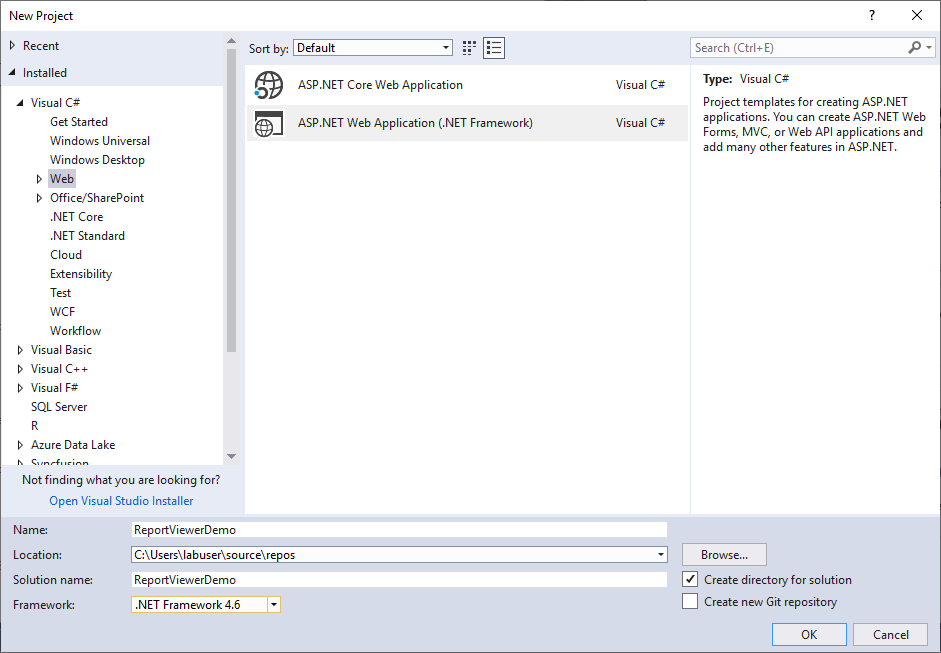
Go to Installed > Visual C# > Web, and then select the required .NET Framework in the drop-down.
-
Select ASP.NET Web Application (.NET Framework), change the application name, and then click OK.
-
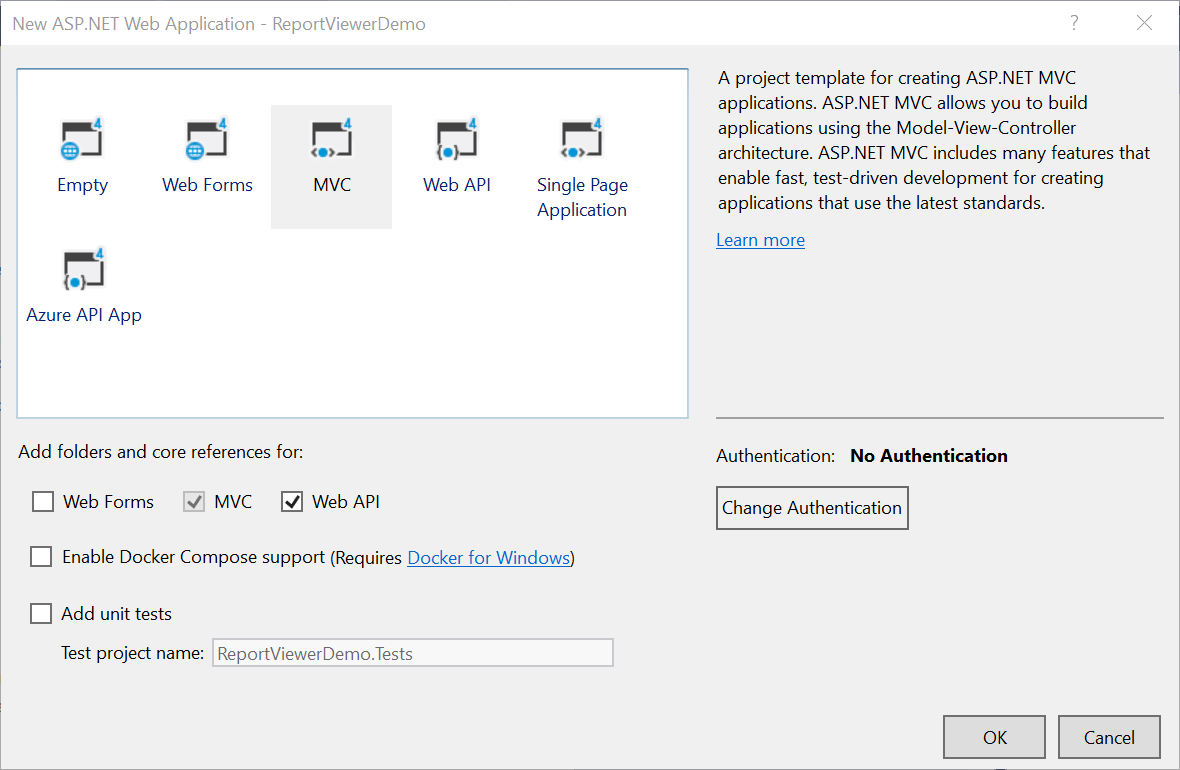
Choose MVC and Web API, and then click OK.
Configure Report Viewer in an application
-
Right-click the project or solution in the Solution Explorer tab, and choose Manage NuGet Packages. Alternatively, go to Tools > NuGet Package Manager > Manage NuGet Packages for Solution.
Refer to the NuGet Packages to learn more details about installing and configuring Report Viewer NuGet packages.
-
Search for
BoldReports.JavaScriptandBoldReports.Mvc5NuGet packages, and install them in your MVC application.Package Purpose BoldReports.Mvc5Contains HTML helpers to create client-side Report Viewer control. BoldReports.JavaScriptContains reporting components scripts and style sheets. -
Open the
~/Views/Web.configfile, and add theBoldReports.Mvcassembly reference to the<system.web.webPages.razor>element.<configuration> .... .... <system.web.webPages.razor> .... .... <pages pageBaseType="System.Web.Mvc.WebViewPage"> <namespaces> .... .... <add namespace="BoldReports.Mvc"/> </namespaces> </pages> </system.web.webPages.razor> .... .... </configuration> -
Set the value of
UnobtrusiveJavaScriptEnabledto false in Root directoryweb.configfile as demonstrated in the following code example.<configuration> <appSettings> ...... ...... <add key="UnobtrusiveJavaScriptEnabled" value="false" /> </appSettings> ...... ...... </configuration>
Refer scripts and CSS
Install the BoldReports.JavaScript and BoldReports.Mvc5 nuget packages into your application.
BoldReports.JavaScript- contains Report Viewer scripts and style sheets.BoldReports.Mvc5- contains HTML Helpers for Report Viewer.
Successful installation adds the scripts, styles to the Scripts and Content folders in your application.
-
The following scripts and style sheets are mandatorily required to use the Report Viewer.
bold.report-viewer.min.cssjquery.min.jsbold.reports.common.min.jsbold.reports.widgets.min.jsbold.report-viewer.min.js
-
Open the
\Views\Shared\_Layout.cshtmlpage. -
Add the listed references in the same order given in above list. You can replace the following code in the
\Views\Shared\_Layout.cshtmlpage.If you need to refer the online CDN links instead of local script and style sheets, then please refer to this Bold Reports® CDN section.
<!DOCTYPE html>
<html>
<head>
    <meta charset="utf-8" />
    <meta name="viewport" content="width=device-width, initial-scale=1.0">
    <title>@ViewBag.Title - My ASP.NET Application</title>
    @Styles.Render("~/Content/css")
    @Styles.Render("~/content/bold-reports/v2.0/tailwind-light/bold.report-viewer.min.css")
    @Scripts.Render("~/bundles/modernizr")
</head>
<body>
    <div style="min-height: 600px;width: 100%;">
        @RenderBody()
    </div>
    @Scripts.Render("~/bundles/jquery")
    @Scripts.Render("~/bundles/bootstrap")
    <!-- Report Viewer component dependent script -->
    @Scripts.Render("~/Scripts/bold-reports/v2.0/common/bold.reports.common.min.js")
    @Scripts.Render("~/Scripts/bold-reports/v2.0/common/bold.reports.widgets.min.js")
    <!-- Report Viewer component script-->
    @Scripts.Render("~/Scripts/bold-reports/v2.0/bold.report-viewer.min.js")
    @RenderSection("scripts", required: false)
    @Html.Bold().ScriptManager()
</body>
</html>
To learn more about rendering a report with data visualization report items, refer to the how to render data visualization report items section.
Configure Script Manager
Open the the ~/Views/Shared/_Layout.cshtml page and add the Script Manager at the end of <body> element as in the following code sample.
<body>
    ....
    ....
    <!-- Bold Reports<sup>®</sup> script manager -->
    @Html.Bold().ScriptManager()
</body>
Initialize Report Viewer
Using Bold() tag, add the Bold Report Viewer component in any web page (cshtml) of your application in the ~/Views folder. For an example, the Index.cshtml page can be replaced with the following code by removing the existing codes.
@(Html.Bold().ReportViewer("viewer"))Report Server Configuration to render the report
Report Viewer requires the serviceAuthorizationToken, reportPath and reportServiceUrl to embed the reports. You can provide the information from report server as like explained below,
reportServiceUrl– Report Server Reporting Service information should be provided for this API.reportServerUrl- Report Server Reporting Server information should be provided for this API.serviceAuthorizationToken– Authorization token to communicate with reportServiceUrl.reportPath- Path of report need to formed with information for category and report name as like/{category name}/{report name}
If you need to know the difference between
reportServiceUrlandreportServerUrl, refer to the Difference between Report Service URL and Report Server URL.
You can follow one of the procedure from below based on your Report Server type,
Enterprise Reporting Server
-
Generate token with your user credentials and assign it to serviceAuthorizationToken. You can refer to the documentation here, to generate the token by using credentials.
    @(Html.Bold().ReportViewer("viewer")
        .ServiceAuthorizationToken("bearer <server token>")
    )
You can refer to the documentation here on how to generate the token within an application.
-
Set the Bold Report Server built-in service URL to the
ReportServiceUrlproperty. TheReportServiceUrlproperty value should be in format ofhttps://<<Report server name>>/reporting/reportservice/api/Viewer.@(Html.Bold().ReportViewer("viewer") .ServiceAuthorizationToken("bearer <server token>") .ReportServiceUrl(@"https://on-premise-demo.boldreports.com/reporting/reportservice/api/Viewer") ) -
Set the Bold Report Server built-in server URL to the
ReportServerUrlproperty. TheReportServerUrlproperty value should be in format ofhttps://<<Report server name>>/reporting/api/site/<<site name>>.@(Html.Bold().ReportViewer("viewer") .ServiceAuthorizationToken("bearer <server token>") .ReportServiceUrl(@"https://on-premise-demo.boldreports.com/reporting/reportservice/api/Viewer") .ReportServerUrl(@"https://on-premise-demo.boldreports.com/reporting/api/site/site1") ) -
Set the path to the report in
reportPathproperty. You can use the following complete code in yourindex.cshtmlpage.@(Html.Bold().ReportViewer("viewer") .ServiceAuthorizationToken("bearer <server token>") .ReportServiceUrl(@"https://on-premise-demo.boldreports.com/reporting/reportservice/api/Viewer") .ReportServerUrl(@"https://on-premise-demo.boldreports.com/reporting/api/site/site1") .ReportPath("/Sample Reports/Company Sales") )
You can also load the report using GUID instead of report location. Set the GUID of the report in the
ReportPathproperty asReportPath("91f24bf1-e537-4488-b19f-b37f77481d00").
Cloud Reporting server
-
Generate token with your user credentials and assign it to serviceAuthorizationToken. You can refer the documentation here, to generate the token by using credentials.
@(Html.Bold().ReportViewer("viewer")
    .ServiceAuthorizationToken("bearer <server token>")
)
You can refer to the documentation here on how to generate the token within an application.
-
Set the Bold Report Server built-in service URL to the
ReportServiceUrlproperty. TheReportServiceUrlproperty value is ahttps://service.boldreports.com/api/Viewer.@(Html.Bold().ReportViewer("viewer") .ServiceAuthorizationToken("bearer <server token>") .ReportServiceUrl(@"https://service.boldreports.com/api/Viewer") ) -
Set the Bold Report Server built-in server URL to the
ReportServerUrlproperty. TheReportServerUrlproperty value should be in format ofhttps://<<Report server name>>/reporting/api/.@(Html.Bold().ReportViewer("viewer") .ServiceAuthorizationToken("bearer <server token>") .ReportServiceUrl(@"https://service.boldreports.com/api/Viewer") .ReportServerUrl(@"https://acmecorp.boldreports.com/reporting/api") ) -
Set the path to the report in
reportPathproperty. You can use the following complete code in yourindex.cshtmlpage.@(Html.Bold().ReportViewer("viewer") .ServiceAuthorizationToken("bearer <server token>") .ReportServiceUrl(@"https://service.boldreports.com/api/Viewer") .ReportServerUrl(@"https://acmecorp.boldreports.com/reporting/api") .ReportPath("/Sample Reports/Company Sales") )
You can also load the report using GUID instead of report location. Set the GUID of the report in the
ReportPathproperty asReportPath("91f24bf1-e537-4488-b19f-b37f77481d00").