How to Configure Timeout Setting for Data Connector
This section specifies how to configure timeout setting for HTTP client.
Timeout setting specifies how long the HTTP client should wait for a response after sending an HTTP request. Increasing the timeout value can help avoid request failures when the HTTP request takes longer to respond.
Defaults and limits:
- Minimum default: 4 minutes
- Maximum allowed: 30 minutes
- Configuration key: TimeOutInMinutes (under the DataOptions section)
Steps to configure timeout settings
-
Navigate to UMS Settings → Configuration → reporting/config.xml.
-
Add or update the following XML nodes:
<DataOptions> <TimeOutInMinutes>{Desired time limit in minutes}</TimeOutInMinutes> </DataOptions> -
Save the file and restart the on‑premises server for the changes to take effect.
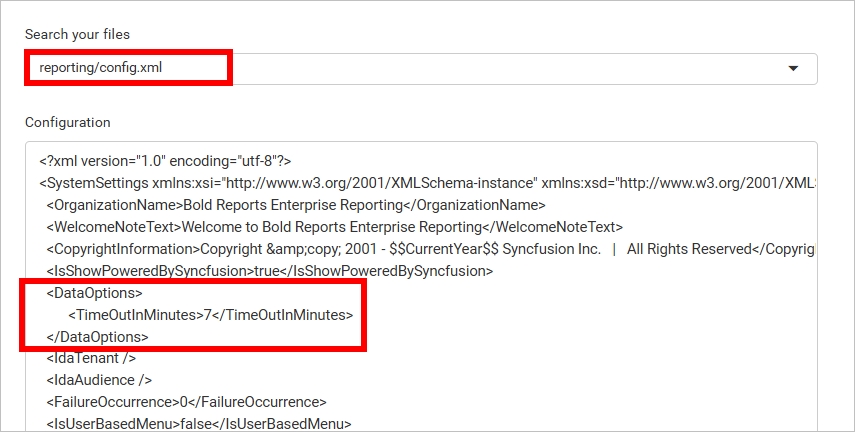
Note: Replace {Desired time limit in minutes} with the required timeout value. If TimeOutInMinutes is not configured, the server uses the default (4 minutes).
Technical Considerations for timeout setting
If Bold Reports® Server is deployed with a reverse proxy server, ensure proxy server’s timeout values are equal to or greater than the configured TimeOutInMinutes value. Otherwise, the server will terminate the connection before the HTTP request times out.
Nginx-Based Environments
Nginx has default request timeout values (commonly around 60–300 seconds, depending on the directive). These timeouts should be adjusted based on application requirements to prevent unexpected client or upstream disconnections. Refer to the table below for recommended Nginx timeout configurations across different environments.
| Environment | File |
| Linux and Docker single-container | /etc/nginx/sites-enabled/default |
| Docker multiple-container | default.conf |
| Kubernetes (K8S) | Ingress.yaml |
Timeout Properties in Linux and Docker environments
    proxy_connect_timeout {Desired time limit in seconds};
    proxy_send_timeout {Desired time limit in seconds};
    proxy_read_timeout {Desired time limit in seconds};
    send_timeout {Desired time limit in seconds};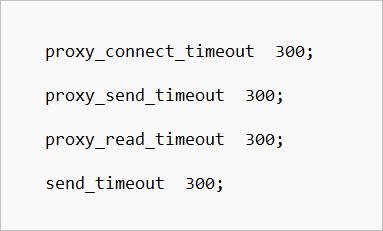
Timeout properties in Kubernetes (K8S) environment
    proxy_connect_timeout {Desired time limit in seconds};
    proxy_send_timeout {Desired time limit in seconds};
    proxy_read_timeout {Desired time limit in seconds};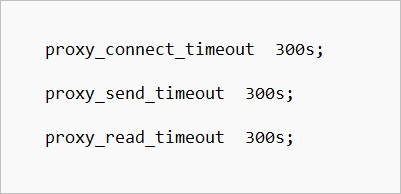
Other Reverse Proxy Servers
If Bold Reports® Server is deployed with a reverse proxy server other than Nginx, configure its equivalent timeout configuration properties (connection, send, and read) for that proxy server.