Playwright deployment in Bold Reports®
By default, Playwright driver nodes are not installed in the build for Azure ARM64 Linux environment. To enable data visualization export, you must manually ship the required Playwright driver binaries by following this guide.
Playwright uses Chromium/Chrome, Firefox, and WebKit to render charts, maps, and gauges.
Configure Playwright for Exporting
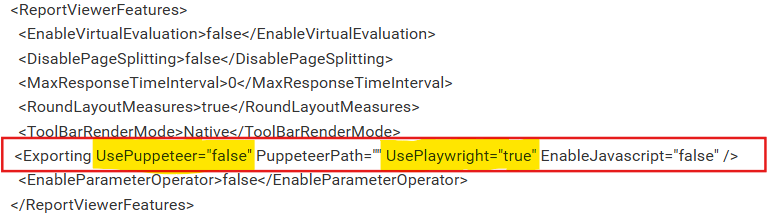
To enable Playwright for data visualization exports, update the configuration file as follows:
Open the config.xml file at the location {deployment_location}\app_data\reporting\configuration\config.xml, add the node as shown below, and then save the file.
<Exporting UsePlaywright="true" PuppeteerPath="" />
Download Playwright Driver Nodes for Your Linux Architecture
Select the appropriate binaries based on your Linux architecture:
| Operating System | Download Link |
|---|---|
Linux (linux-arm64) |
linux armx64.zip |
Linux (linux-x64) |
linux x64.zip |
After extracting the downloaded archive, move the playwright binaries in the following directories:
{Install Root}\application\reporting\api.playwright\node
{Install Root}\application\reporting\jobs.playwright\node
{Install Root}\application\reporting\web.playwright\node\
Tip: If the
.playwright\nodedirectory does not exist, create it manually.
Set File Permissions
To execute the Playwright driver nodes, enable executable permissions for the jobs, api, and web services as shown:
| Commands | Details |
|---|---|
sudo chmod -R 777 /var/www/bold-services/application/reporting/* |
Grant read, write, and execute permissions to all reporting applications under the reporting directory. Use with caution in production. |
sudo chmod -R 777 /var/www/bold-services/application/reporting/web |
Grant permissions for the web application only. |
sudo chmod -R 777 /var/www/bold-services/application/reporting/jobs |
Grant permissions for the jobs application only. |
sudo chmod -R 777 /var/www/bold-services/application/reporting/api |
Grant permissions for the api application only. |
Note:
- The 777 permission is broad and suitable for quick verification. For production environments, use more restrictive permissions based on your service user and group.