Localization of Bold Reports® Angular Report Viewer
To localize the Bold Reports® Angular Report Viewer, refer to the following corresponding culture script files and set the culture name to the locale property of the Report Viewer. Localization renders static text such as tooltips, the parameter block, and dialog text in a specific culture.
* `ej.localetexts.fr-FR.min.js`Refer to the CDN links for Localization and Culture to get the Localization and Culture scripts for the available culture codes.
-
Run the following command to install the
@boldreports/javascript-reporting-controlspackage.npm install @boldreports/javascript-reporting-controls --save -
Refer to the
ej.localetexts.fr-FR.min.jsscript file fromnode_modulesin theapp.module.tsfile.
import { NgModule, enableProdMode, ErrorHandler } from '@angular/core';
import { BrowserModule } from '@angular/platform-browser';
import { RouterModule } from '@angular/router';
import { FormsModule } from '@angular/forms';
import { HttpModule } from '@angular/http';

import { BoldReportsAngularModule } from '@boldreports/angular-reporting-components';
import '@boldreports/javascript-reporting-controls/Scripts/v2.0/localization/l10n/ej.localetexts.fr-FR.min.js';
import { AppComponent } from './app.component';
import { TextboxComponent } from './textbox/textbox.component';
...
...
If you import the culture before the
BoldReportsAngularModule, you will get the following error in the application. Import the culture after the@boldreports/angular-reporting-componentspackage.
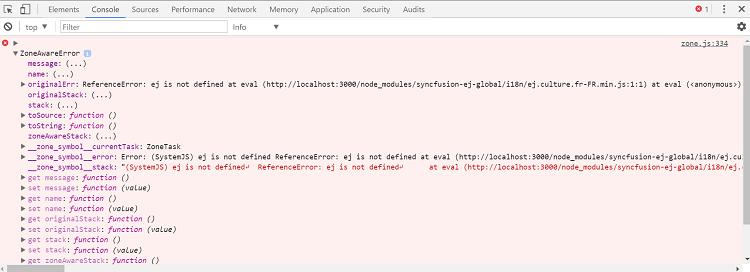
Initialize the locale property in the component.ts and component.html pages.
<bold-reportviewer id="reportViewer_Control"
    [reportServiceUrl] = "serviceUrl"
    [processingMode] = "Remote"
    [reportServerUrl] = "serverUrl"
    [reportPath] = "reportPath"
    [locale]='locale'>
</bold-reportviewer>
import { Component, ViewChild } from '@angular/core';
import { BoldReportsAngularModule } from '@boldreports/angular-reporting-components/src/core';
@Component({
selector: 'ej-app',
templateUrl: './app.component.html',
styleUrls: ['./app.component.css']
})
export class AppComponent {
public serviceUrl: string;
public reportPath: string;
public serverUrl: string;
public locale: string;
constructor() {
this.serviceUrl = 'https://demos.boldreports.com/services/api/ReportApi';
this.reportPath = 'Sales Order Detail.rdl';
this.locale = "fr-FR";
}
}