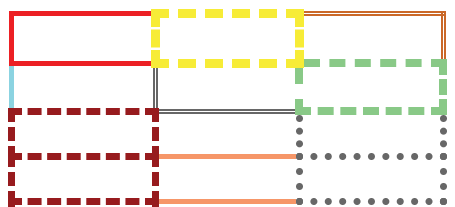
Tablix cell border in Bold Reports® Web Report Designer
In the Bold Reports® Web Report Designer, a tablix cell is the intersection between a row and a column in a tablix data region. Cells are visually separated using borders based on the collapsed-border table rendering model. Two adjacent cells share a border.
How do tablix cell borders behave?
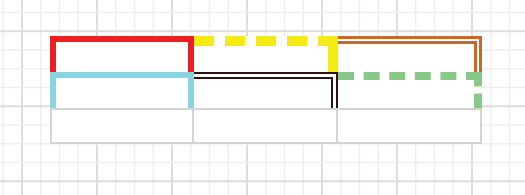
The border behavior of each tablix cell in the Bold Reports® Web Report Designer varies based on its position in the table. In the following image, the table item contains three rows and columns.
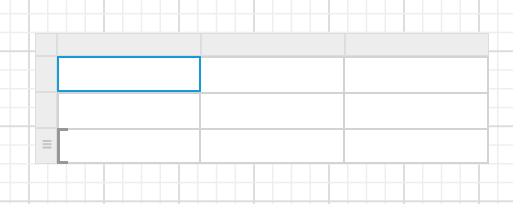
Which borders apply to the first cell of the first row?
If you apply a border to the cell in position (0,0) of the table, the border is applied to the respective cell based on the collapsing borders model behavior.
| Border Type | Applicable |
|---|---|
| border-left | Yes |
| border-top | Yes |
| border-right | Yes |
| border-bottom | No |
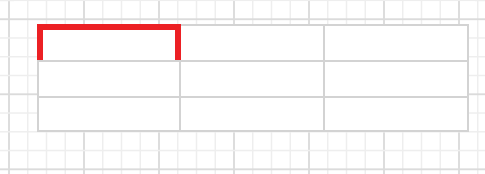
Which borders apply to the other cells of the first row?
If you apply a border to the cell in position (0,1) of the table, the following borders apply:
| Border Type | Applicable |
|---|---|
| border-left | No |
| border-top | Yes |
| border-right | Yes |
| border-bottom | No |
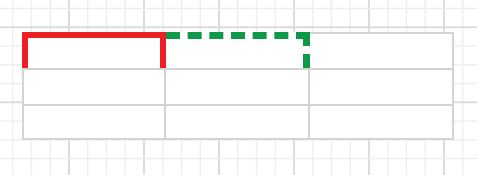
The other cells in the first row inherit the same behavior as the (0,1) cell.
All rows in the table except the last row inherit the above border behavior.
Which borders apply to the first cell of the last row?
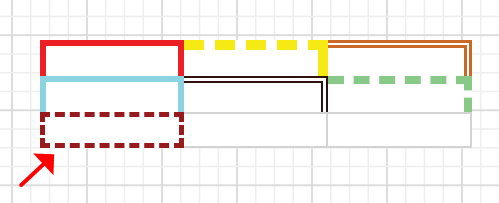
If you apply a border to the last row, first cell position, the following borders apply:
| Border Type | Applicable |
|---|---|
| border-left | Yes |
| border-top | Yes |
| border-right | Yes |
| border-bottom | Yes |
Which borders apply to the other cells of the last row?
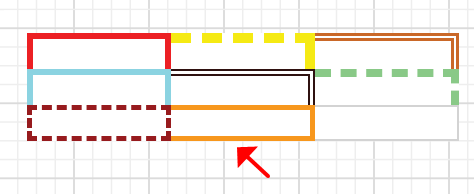
If you apply a border to the last row, second cell position, the following borders apply.
| Border Type | Applicable |
|---|---|
| border-left | No |
| border-top | Yes |
| border-right | Yes |
| border-bottom | Yes |
The other cells in the last row inherit the same behavior as the second cell position.
How do borders look in report preview?
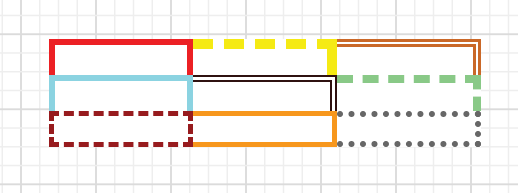
On report preview in Bold Reports®, the border properties are applied to the four sides of each cell in the table.