How to configure SSL for Bold Reports® application on Docker
You configure SSL for a Bold Reports® Docker Compose deployment by adding your .key and .crt certificate files to Nginx and restarting the container. The steps differ for single container and multi container deployments.
Single container deployment
Bold Reports® single container deployments use an nginx volume to hold the SSL certificate. Follow these steps:
-
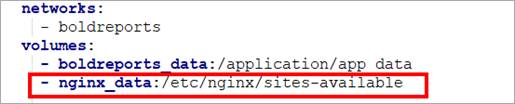
In the docker-compose yaml file, add the following line under volume in the
boldreportsservice:- nginx_data:/etc/nginx/sites-availableThe following screenshot shows the nginx volume in the docker-compose.yml file.
-
Add the following block for
nginxin volume and allocate a directory in your host machine to store the shared folders for applications’ usage. Replace the directory path with<host_path_nginx_data>in the docker-compose.yml file and bring up a container.nginx_data: driver: local driver_opts: type: 'none' o: 'bind' device: '<host_path_nginx_data>'For example,
Windows:device: 'D:/boldreports/nginx_data'anddevice: 'D:/boldreports/nginx_data'
Linux:device: '/var/boldreports/nginx_data'anddevice: '/var/boldreports/nginx_data' -
Copy the SSL certificate in
.keyand.crtformat and paste it inside thenginxmount folder. -
Refer to the following SSL termination document for SSL changes in the
nginxfile.https://github.com/bold-reports/bold-reports-docker/blob/master/docs/ssl-termination.md
-
Restart the Bold Reports® container using the following command:
docker restart <container-name or container ID>
Multi container deployment
Bold Reports® multi container deployments take the SSL certificate path in the docker-compose yaml file and use a separate Nginx container. Follow these steps:
-
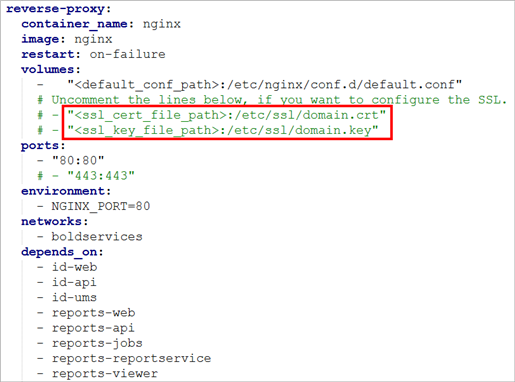
Add an SSL certificate path with the
.keyand.crtfile in the docker-compose yaml file.The following screenshot shows the certificate paths in the docker-compose.yml file.
-
Refer to the following SSL termination document for SSL changes in the
nginxfile.https://github.com/bold-reports/bold-reports-docker/blob/master/docs/ssl-termination.md
-
Restart the Nginx container using the following command:
docker restart <container-name or container ID>
Frequently asked questions
Which certificate files does Bold Reports® need for SSL on Docker?
Bold Reports® needs the SSL certificate in .key and .crt format.
Which container do I restart after adding SSL?
For a Bold Reports® single container deployment, restart the Bold Reports® container. For a multi container deployment, restart the Nginx container.