Installing and Upgrading Bold Reports® Using an RPM Package
Starting from Bold Reports® version 7.1, we now provide support for installing and upgrading Bold Reports® using an RPM package.
Installation Steps
-
Before installing Bold Reports®, ensure that the EPEL (Extra Packages for Enterprise Linux) repository is installed on your machine. If it is not installed, run the following command:
sudo dnf install https://dl.fedoraproject.org/pub/epel/epel-release-latest-9.noarch.rpm -
Run the following command to configure the Bold Reports® YUM repository:
dnf install https://rpm.boldreports.com/RPM/repo/boldreports-repo-1.1-1.noarch.rpm -
Once the repository is configured, install the Bold Reports® package using the following command:
dnf install boldreports -
After the package is installed, ensure that Nginx is enabled and started by running the following commands.
systemctl enable nginx systemctl start nginx -
Then, navigate to /opt/boldreports/boldreports-package/ and run the following command to install Bold Reports®.
sudo bash install-boldreports.sh -i {new} -u {user} -h {host URL} -n {true or false} eg : sudo bash install-boldreports.sh -i new -u root -h http://linux.example.com -n true -
Please refer to the documentation below to configure Nginx for SSL.
Steps to Upgrade Bold Reports®
-
Run the following command to upgrade Bold Reports® and wait until the script completes the upgrade process:
dnf upgrade or dnf upgrade boldreports -
Once the package is upgraded, you will see the following message. You can then access the application and verify the version.
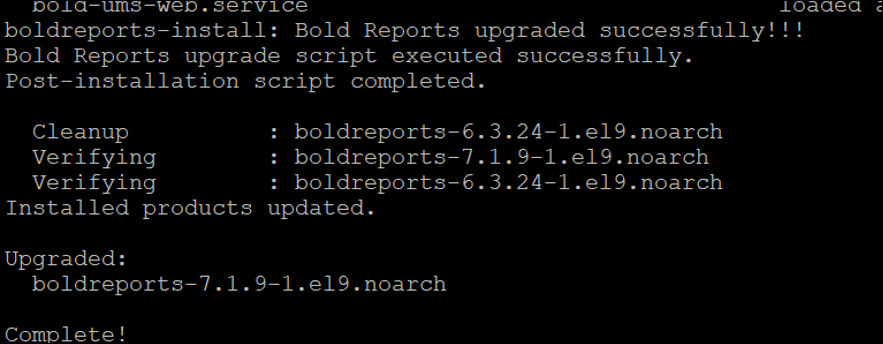
-
The above command checks the Bold Reports® repository and upgrades the application if an updated version is available. If no upgrade is available, it will display the following message.

Note: To clear the DNF package cache and refresh the repository metadata, run the following commands:
sudo dnf clean all
sudo dnf makecache —refresh