How to apply the patches to Bold Reports® Enterprise Reporting
The support team provides solutions to the reported issues in the form of patch, which contain assemblies or files and this topic explains how to apply these patches to Bold Reports® Enterprise Reporting.
Download and extract the patch provided in the support incident.
If extracted patch contains only assemblies, then follow below steps to apply patch on Report Server and IDP location in Bold Reports®.
Support team will mention and provide separate patch assemblies for Report Server and IDP.
Replace the provided assemblies in the respective location of Bold Reports® as shown in the following table and after replacing the assemblies, start the Bold Reports® application by using the desktop shortcut IIS/IIS Express.
|
Assemblies
|
Bold Reports® location
|
|
BoldReports.Web
Syncfusion.XlsIO.Base
Syncfusion.Pdf.Base
Syncfusion.DocIO.Base
Syncfusion.OfficeChart.Base
Syncfusion.Compression.Base
Syncfusion.Presentation.Base
BoldReports.Base.Logger
Bold.Licensing
BoldReports.DataExtensions.MySQL
BoldReports.DataExtensions.PostgreSQL
BoldReports.DataExtensions.SSAS
BoldReports.DataExtensions.WebAPI
BoldReports.Extensions.BarcodeCRI
Syncfusion.SfBarcode.WPF
|
C:\Bold Reports\Report Server\bin
C:\Bold Reports\Report Server\API\bin
C:\Bold Reports\Report Server\ReportService\bin
C:\Bold Reports\Report Server\Jobs\bin
|
|
Syncfusion.Server.Base.Scheduler
Syncfusion.Server.Base
Syncfusion.Server.Base.IdPDirectory
Syncfusion.Server.Base.Item
Syncfusion.Server.Base.Resources.Storage
Syncfusion.Server.Base.Data
Syncfusion.Server.Base.DataClasses
Syncfusion.Server.ActiveDirectory.Base
Syncfusion.Server.Base.MarkdownSharp
Syncfusion.Server.Base.Encryption
Syncfusion.Server.Base.Logger
|
C:\Bold Reports\Report Server\bin
C:\Bold Reports\Report Server\API\bin
C:\Bold Reports\Report Server\Jobs\bin
|
|
Syncfusion.Server.Jobs
|
C:\Bold Reports\Report Server\Jobs\bin
|
|
Syncfusion.Server.Reports
|
C:\Bold Reports\Report Server\bin
|
|
Syncfusion.Server.API
|
C:\Bold Reports\Report Server\API\bin
|
|
Syncfusion.Server.API.Base
Syncfusion.Server.Base.Notification
Syncfusion.Server.Base.Collaboration
|
C:\Bold Reports\Report Server\bin
C:\Bold Reports\Report Server\API\bin
|
|
BoldReports.Server.Services
|
C:\Bold Reports\Report Server\ReportService\bin
|
|
Assemblies
|
IDP location
|
|
Syncfusion.Server.IdentityProvider.API
|
C:\Bold Reports\IDP\bin
C:\Bold Reports\IDP\API\bin
|
Syncfusion.Server.IdentityProvider
Syncfusion.Server.Base.MarkdownSharp
|
C:\Bold Reports\IDP\bin
|
|
Syncfusion.Server.Base
Syncfusion.Server.Base.Resources.Storage
Syncfusion.Server.Base.Data
Syncfusion.Server.Base.DataClasses
Syncfusion.Server.ActiveDirectory.Base
Syncfusion.Server.Base.Encryption
Syncfusion.Server.Base.Logger
|
C:\Bold Reports\IDP\bin
C:\Bold Reports\IDP\API\bin
C:\Bold Reports\IDP\UMS\bin
|
|
Syncfusion.Server.API.Base
|
C:\Bold Reports\IDP\API\bin
|
|
Syncfusion.TenantManagement
Syncfusion.Server.LicenseHelper
|
C:\Bold Reports\IDP\UMS\bin
|
If the extracted patch contains files in a folder structure, to apply the patch files in the Bold Reports® Enterprise Reporting, you can follow these steps:
- Copy the folder and replace into the respective Report Server location
C:\Bold Reports\Report Server as follows. By default, Bold Reports® will be installed in C:\Bold Reports<sup>®</sup> location.
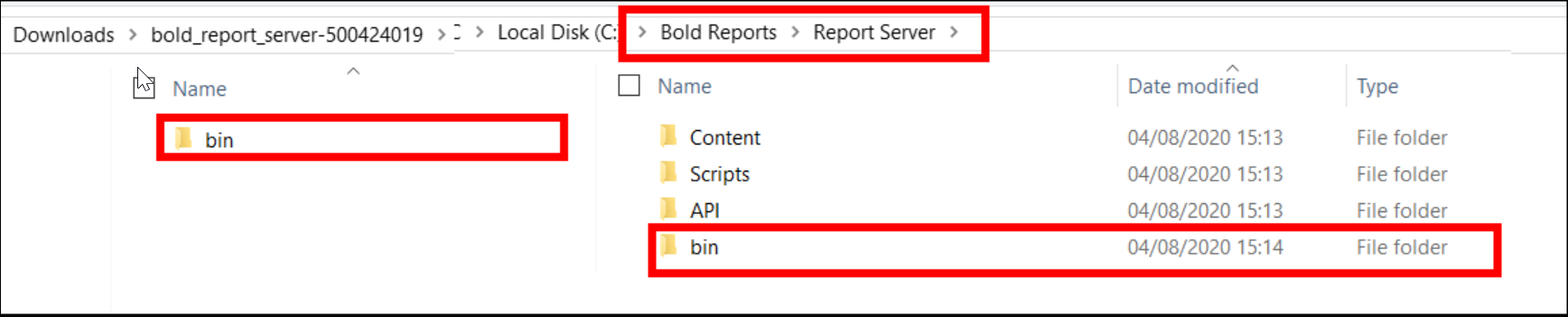 >If the patch was provided for IDP, then replace the copied folders to the respective IDP location
 C:\Bold Reports\IDP.
> 2. Then, start the Bold Reports® application by using the desktop shortcut IIS/IIS Express.