Where can i find the error and debug log files of Bold Reports® Azure App Service
Error logs
Error log files are generated when an exception occurs while configuring or interacting with the Bold Reports® application.
Debug logs
Event log files record the complete user interaction details one after the other when users interact with the Bold Reports® application.
Log directories
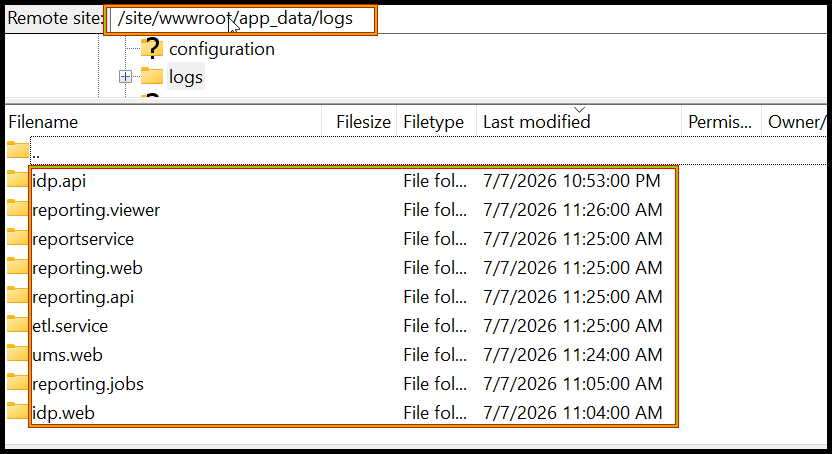
For any configurations made in the Bold Reports®, log files are generated in /site/wwwroot/app_data/logs location.
By default, the Bold Reports® Azure App Service will be deployed in
/site/wwwroot/location.
Steps to get the log files from Bold Reports® Azure App service
-
Log in to the Azure portal.
-
Select the Bold Reports® Azure App Service.
-
Stop the Bold Reports® Azure App Service, and then click the Get publish profile.
-
Save the
<App service name>, PublishSettings file and open it. The file contains three<publishProfile>sections for Web Deploy, FTP, and ReadOnly-FTP. -
From the FTP
<publishProfile>section, copy the following values:publishUrluserNameuserPWD
-
Download and install the FileZilla client application.
-
After installing the application, set the values obtained from the PublishSettings file accordingly:
Host: Give the
publishUrlvalue.Username: Give the
userNamevalue.Password: Give the
userPWDvalue. -
After entering these values as shown in the following image, click
Quickconnect.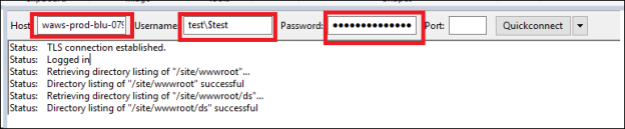
-
You can find the Bold Reports® Azure App Service logs, as shown in the images below.