Built-in fields in Web Report Designer expressions
Built-in fields in Bold Reports® Web Report Designer are global variables that specify the report name, page number, and execution time in a report. They include the Globals and the User collections.
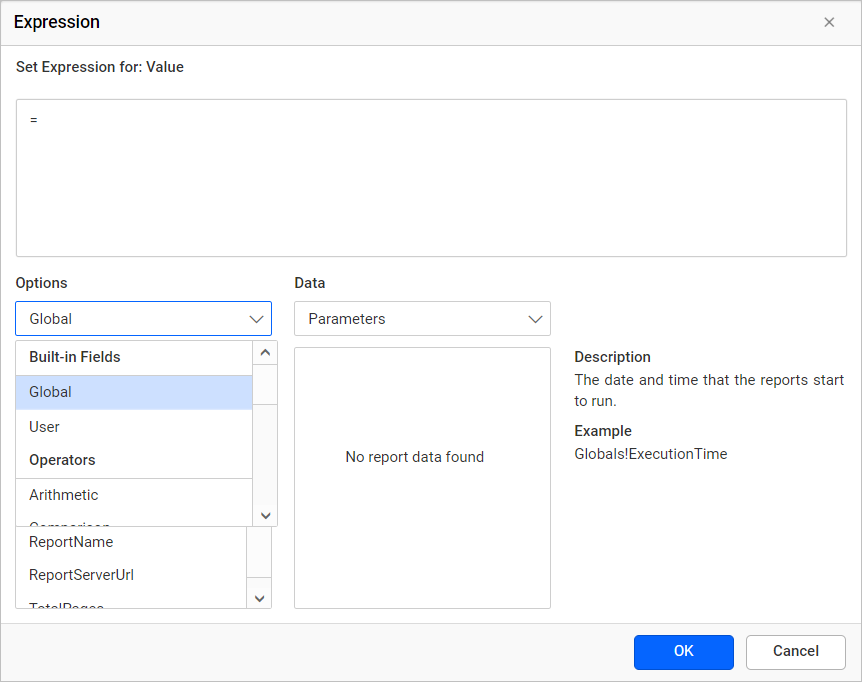
Global Collection
The Globals collection in Bold Reports® provides values such as the name of the report, the time when report processing starts, and current page numbers for the report header or footer.
| Member | Type | Description |
|---|---|---|
ExecutionTime |
DateTime | The date and time that the report start to run. |
PageNumber |
Integer | The current page number that can be reset through the use of page breaks. |
ReportFolder |
String | The full path to the folder containing the report. This does not include the Bold Reports® Report Server URL. |
ReportName |
String | The name of the report as it is stored in the Report Server database. |
ReportServerSiteName |
String | The site identifier of the Report Server on which the report is being run. |
ReportServerUrl |
String | The URL of the Report Server on which the report is being run. |
TotalPages |
Integer | The total number of pages in the current continuous page sequence can be used only in the page header and footer. The number can be reset by using page breaks. |
PageName |
String | The name of the current page in the report can be used only in the page header or footer. |
OverallPageNumber |
Integer | The page number of the current page for the entire report. This value is not affected by ResetPageNumber. |
OverallTotalPages |
Integer | The total number pages for the entire report. This value is not affected by ResetPageNumber. |
RenderFormat |
RenderFormat | Information about the current rendering request. |
RenderFormat.Name |
String | The name of the renderer as registered in the RSReportServer configuration file. |
RenderFormat.IsInteractive |
Boolean | Whether the current rendering request uses an interactive rendering format. |
User Collection
The User collection in Bold Reports® provides the user identifier and language settings. You can use these values in expressions to filter results in a report.
| Member | Type | Description |
|---|---|---|
Language |
String | The language ID of the client running the report. |
UserID |
String | The ID of the user running the report. |
Frequently asked questions
Which built-in fields can I use only in the page header or footer?
TotalPages and PageName can be used only in the page header or footer.
Does ResetPageNumber affect OverallPageNumber?
No. OverallPageNumber and OverallTotalPages are not affected by ResetPageNumber.