Embedded
ForumKB
Try it Free
How To
FAQ
Troubleshooting
Collapse
How To

How to print the report without margin

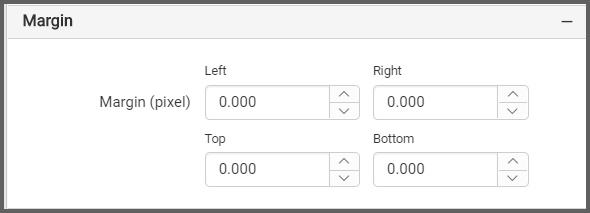
To print a report without margins in Bold Reports®, set the left, right, top, and bottom spacing of the report layout to 0 with the Margin property.

Margin property of the report layout

See also

  • Avoid extra blank pages in print and print preview
  • Set page setting values in the export process
  • Print the report with an external button
Was this page helpful?
Like
Dislike
Previous
How to resolve the Multiple actions were found that matches the request issue?
Next
How to set page setting values in export?
Copyright © 2001 - 2026 Syncfusion Inc. All Rights Reserved
© 2001 - 2026 Syncfusion Inc.
Terms of UsePrivacy PolicyCookie Policy