Integrate the component with Report Server
You can embed Report Designer with Report Server to create, edit, browse and publish reports using the Report Server built-in API service.
Follow this steps to integrate Report Server with Bold Reports® Designer version higher than
v8.1.xx
Create ASP.NET MVC 5 web application
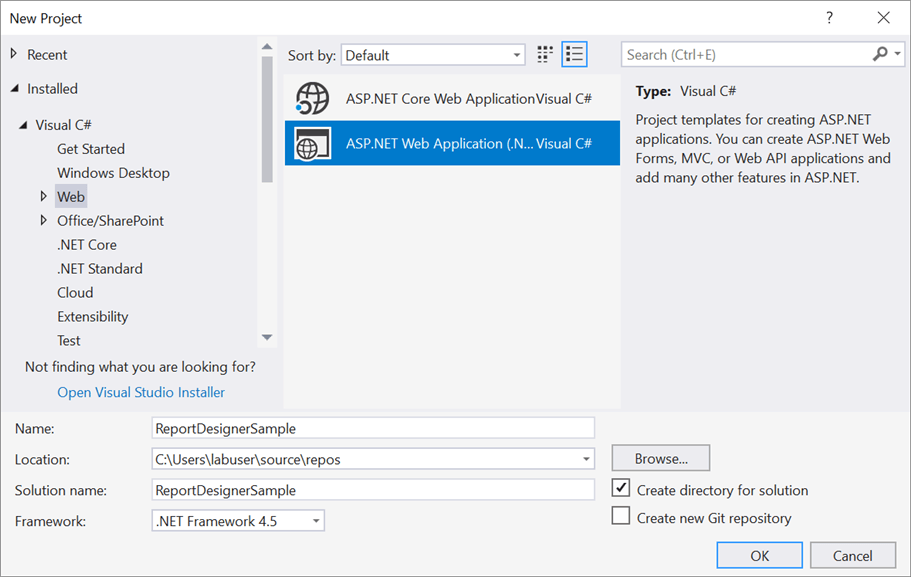
- Open Visual Studio 2022, click the File menu, go to New, and then select Project.
- Go to Installed > Visual C# > Web, and then select the required .NET Framework in the drop-down.
- Select ASP.NET Web Application (.NET Framework), change the application name, and then click OK.
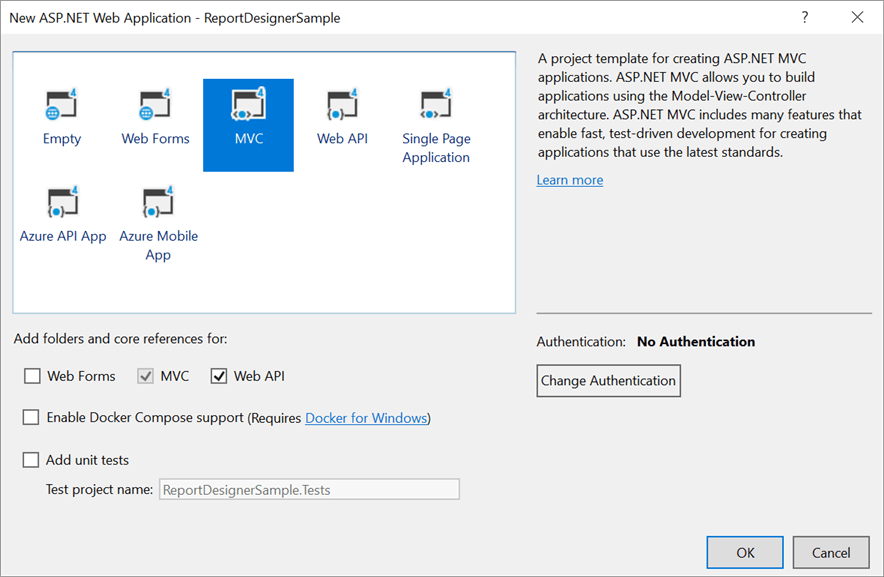
- Then choose the MVC in the template and enable the Web API option in the Add folders and core references for: section.
Add Assembly References
-
Right-click the project/solution in the Solution Explorer tab, and choose
Manage NuGet Packages…. Alternatively, select the Tools > NuGet Package Manager > Manage NuGet Packages for Solution menu command.Refer to the NuGet Packages to learn more details about installing and configuring Report Designer NuGet packages.
-
Search for
BoldReports.Web,BoldReports.Mvc5, andBoldReports.JavaScriptNuGet packages, and install them in your MVC application.Package Purpose BoldReports.WebUsed to create Web API service for processing the reports. BoldReports.Mvc5Contains tag helpers to create client-side web Report Designer control. BoldReports.JavaScriptContains Report Designer scripts and style sheets.
Registering namespaces within Web.config
Open ~/Views/Web.config file and add the BoldReports.Mvc namespace under the namespaces tag.
<namespaces>
    <add namespace="BoldReports.Mvc"/>
</namespaces>
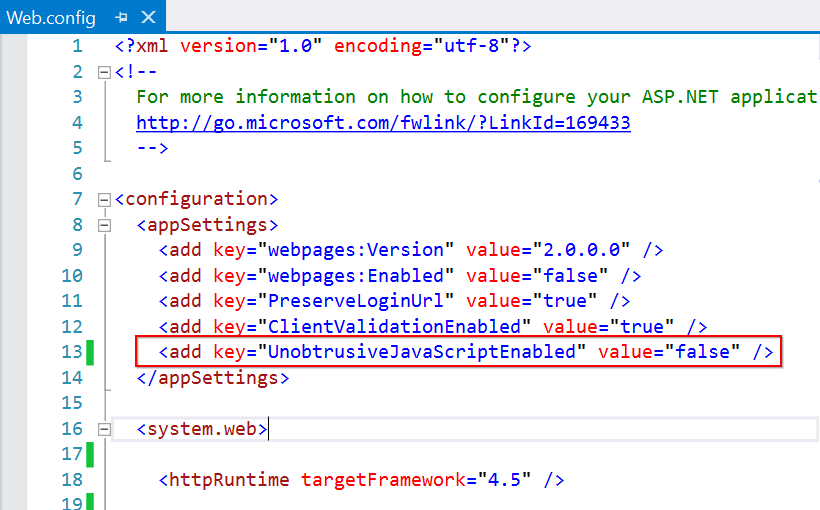
Disable unobtrusive mode
Set the UnobtrusiveJavaScriptEnabled to false in Web.config file of root directory as shown in the below image.
Refer Scripts and Styles
Add the listed references in the same order as follows. You can replace the following code in the \Views\Shared\_Layout.cshtml page.
<!DOCTYPE html>
<html>
<head>
    <meta charset="utf-8" />
    <meta name="viewport" content="width=device-width, initial-scale=1.0">
    <title>@ViewBag.Title - My ASP.NET Application</title>
    @Styles.Render("~/Content/css")
    @Styles.Render("~/Content/bold-reports/v2.0/tailwind-light/bold.report-designer.min.css")
    @Styles.Render("~/Scripts/CodeMirror/lib/codemirror.css")
    @Styles.Render("~/Scripts/CodeMirror/addon/hint/show-hint.css")
    @Scripts.Render("~/bundles/modernizr")
</head>
<body>
    <div style="height: 600px;width: 100%;">
        @RenderBody()
    </div>
    @Scripts.Render("~/bundles/jquery")
    @Scripts.Render("~/bundles/bootstrap")
    @Scripts.Render("~/Scripts/CodeMirror/lib/codemirror.js")
    @Scripts.Render("~/Scripts/CodeMirror/addon/hint/show-hint.js")
    @Scripts.Render("~/Scripts/CodeMirror/addon/hint/sql-hint.js")
    @Scripts.Render("~/Scripts/CodeMirror/mode/sql/sql.js")
    @Scripts.Render("~/Scripts/CodeMirror/mode/vb/vb.js")

    <!-- Report Designer component dependent scripts -->
    @Scripts.Render("~/Scripts/bold-reports/v2.0/common/bold.reports.common.min.js")
    @Scripts.Render("~/Scripts/bold-reports/v2.0/common/bold.reports.widgets.min.js")

    <!-- Report Viewer and Designer component scripts -->
    @Scripts.Render("~/Scripts/bold-reports/v2.0/bold.report-viewer.min.js")
    @Scripts.Render("~/Scripts/bold-reports/v2.0/bold.report-designer.min.js")
    @RenderSection("scripts", required: false)
</body>
</html>
Refer to the Dependencies to learn more details about web Report Designer dependent scripts and style sheets links.
Configure Script Manager
Open the ~/Views/Shared/_Layout.cshtml page and add the Script Manager at the end of <body> element as in the following code sample.
<body>
    ....
    ....
    <!-- Bold Reporting ScriptManager -->
    @Html.Bold().ScriptManager()
</body>
The main reason for referring to the Script manager in
_Layout fileis that, it can be referred as common by all the View files present within your application.
Add Control in View page
Using Bold() tag, add the Bold Report Designer component in any web page (cshtml) of your application in the ~/Views folder.
@(Html.Bold().ReportDesigner("designer"))Report Server Configuration to design the report
-
The Report Designer requires the
serviceAuthorizationToken,serviceUrlandreportServerUrlto perform the API actions with Bold Report Server. You can provide the information from report server as like explained below, -
serviceUrl– Report Server Reporting Service information should be provided for this API. -
serviceAuthorizationToken– Authorization token to communicate with reportServiceUrl. -
reportServerUrl- Report Server Reporting Server information should be provided for this API.
You can follow one of the procedure from below based on your Report Server type,
Enterprise Reporting Server
-
Generate token with your user credentials and assign it to serviceAuthorizationToken. You can refer to the documentation here, to generate the token by using credentials.
@(Html.Bold().ReportDesigner("designer")
            .ServiceAuthorizationToken("bearer <server-token>")
        )
You can refer to the documentation here on how to generate the token within an application.
-
Set the Bold Report Server built-in service URL to the
ServiceUrlproperty. TheServiceUrlproperty value should be in format ofhttps://<<Report server name>>/reporting/reportservice/api/Designer.@(Html.Bold().ReportDesigner("designer") .ServiceAuthorizationToken("bearer <server-token>") .ServiceUrl(@"https://<your-report-server-domain>/reporting/reportservice/api/Designer") ) -
Set the Bold Report Server built-in server URL to the
ReportServerUrlproperty. TheReportServerUrlproperty value should be in format ofhttps://<<Report server name>>/reporting/api/site/<<site name>>.@(Html.Bold().ReportDesigner("designer") .ServiceAuthorizationToken("bearer <server-token>") .ServiceUrl(@"https://<your-report-server-domain>/reporting/reportservice/api/Designer") .ReportServerUrl(@"https://<your-report-server-domain>/reporting/api/site/<site-name>") )
Cloud Reporting server
-
Generate token with your user credentials and assign it to serviceAuthorizationToken. You can refer the documentation here, to generate the token by using credentials.
    @(Html.Bold().ReportDesigner("designer")
    .ServiceAuthorizationToken("bearer <server-token>")
    )
You can refer to the documentation here on how to generate the token within an application.
-
Set the Bold Report Server built-in service URL to the
ServiceUrlproperty. TheServiceUrlproperty value is ahttps://service.boldreports.com/api/Designer.@(Html.Bold().ReportDesigner("designer") .ServiceAuthorizationToken("bearer <server-token>") .ServiceUrl(@"https://service.boldreports.com/api/Designer") ) -
Set the Bold Report Server built-in server URL to the
ReportServerUrlproperty. TheReportServerUrlproperty value should be in format ofhttps://<<Report server name>>/reporting/api/.@(Html.Bold().ReportDesigner("designer") .ServiceAuthorizationToken("bearer <server-token>") .ServiceUrl(@"https://service.boldreports.com/api/Designer") .ReportServerUrl(@"https://<your-report-server-domain>/reporting/api/") )