Connect MongoDB with Bold Data Hub
The Bold Data Hub MongoDB connector loads data from a MongoDB database into Bold Reports®. MongoDB is a NoSQL database that stores JSON-like documents. You can refresh data in INCREMENTAL or FULL_TABLE mode.
Connection Properties
The MongoDB connector in Bold Data Hub reads the following properties from the config section of a YAML file:
connectorname: MongoDB
    config:
      connection_url: mongodb://dbuser:passwd@host:port
      database: databasenmae
    select:
      - tablename
Which MongoDB connection URL should I use?
The MongoDB connection URL for Bold Data Hub depends on how you deploy MongoDB. These are the typical ways to configure MongoDB and their connection URLs:
| Name | Description | Connection URL Example |
|---|---|---|
| Local Installation | Install on Windows, macOS, Linux using official packages. |
mongodb://dbuser:[email protected]:27017 |
| Docker | Deploy using the MongoDB Docker image. | mongodb://dbuser:[email protected]:27017 |
| MongoDB Atlas | MongoDB’s managed service on AWS, Azure, and Google Cloud. | mongodb+srv://dbuser:[email protected] |
| Managed Cloud | AWS DocumentDB, Azure Cosmos DB, and others offer MongoDB as a managed database. |
mongodb://dbuser:[email protected]:27017 |
| Configuration Tools | Use Ansible, Chef, or Puppet for automation of setup and configuration. |
mongodb://dbuser:[email protected]:27017 |
| Replica Set | Set up for high availability with data replication across multiple MongoDB instances. | mongodb://dbuser:[email protected]:27017 |
Sharded Cluster |
Scalable distribution of datasets across multiple MongoDB instances. | mongodb://dbuser:[email protected]:27017 |
| Kubernetes | Deploy on Kubernetes using Helm charts or operators. | mongodb://dbuser:[email protected]:27017 |
| Manual Tarball | Install directly from the official MongoDB tarball, typically on Linux. | mongodb://dbuser:[email protected]:27017 |
How do I connect MongoDB in Bold Data Hub?
You connect MongoDB by creating a project in Bold Data Hub and adding the MongoDB template to it.
-
Click the
Data Hubicon on the Navigation Pane.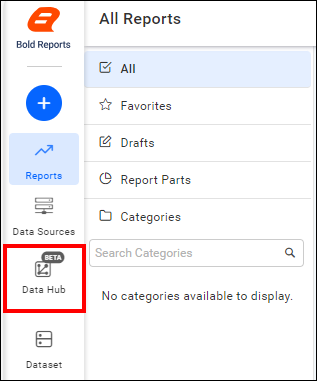
-
Click
Add Projectand enter a name for the new project.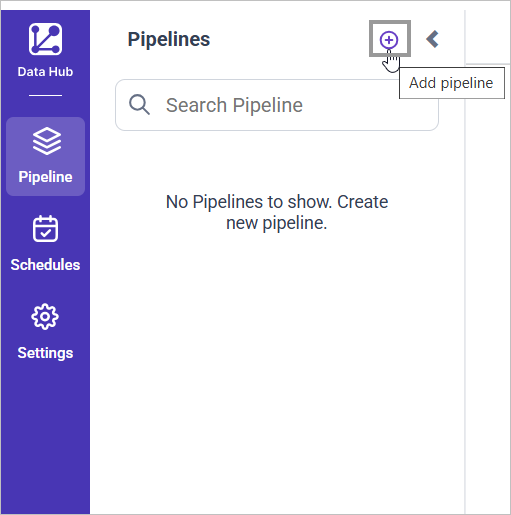
-
Select the newly created project and add the
MongoDBtemplate.
-
Update the details required in the template, using the configuration parameters below.
-
Click Save and choose the destination to save the pipeline.

Creating a pipeline in Bold Data Hub automatically creates a data source in Bold Reports®. The Bold Reports® data source is a live data source to the destination database used in Bold Data Hub.
Configuration Parameters
The MongoDB template in Bold Data Hub uses these parameters:
| Parameters | Description |
|---|---|
| Name: | MongoDB |
| Connector Name: | MongoDB |
| Connection URL: | Specify the connection URL for the MongoDB server in the format mongodb://dbuser:passwd@host:port. |
| Database: | Specify the name of the MongoDB database from which data will be extracted. |
| Select: | Tablename(s): Specify the table name list to load tables from the MongoDB server. |
How do I schedule the MongoDB pipeline?
You schedule the MongoDB pipeline in Bold Data Hub from the schedules tab, or you run it on demand.
-
To configure interval-based scheduling, click the schedules tab, select the created pipeline, click the schedule icon, and configure the schedule.


-
For an on-demand refresh, click the
Run Nowbutton.
-
Check the schedule history with the history option and the logs.
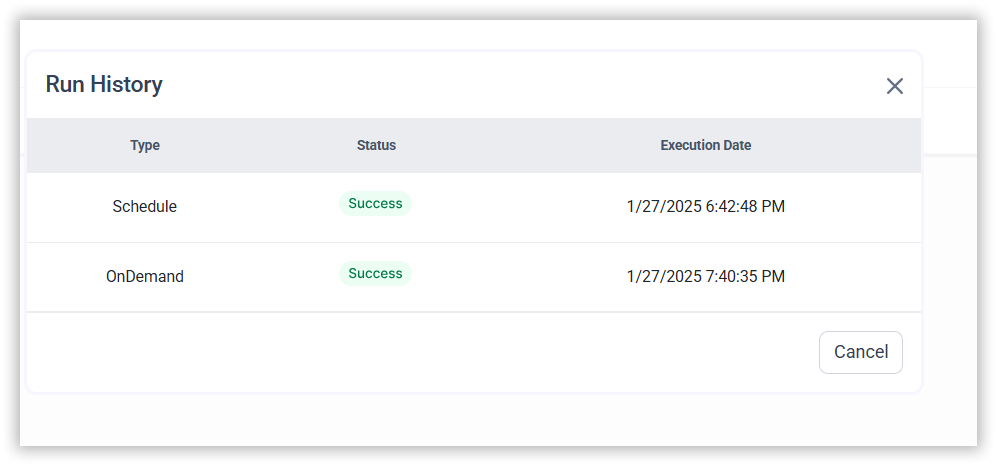
-
Click Logs to see whether the run is completed and the data source is created in Bold Reports®.

-
Click the
Edit DataSourceoption to view the created tables.
Metadata Properties
The metadata section of the Bold Data Hub MongoDB template defines the mode of data refresh. There are two modes: INCREMENTAL and FULL_TABLE. Both support datetime and Unix format.
| Properties | Description |
|---|---|
| replication_method: | mode of data refresh - INCREMENTAL and FULL_TABLE |
| replication_key: | Specifies the column in the source data used to track and fetch records during replication |
| replication_value: | Specifies the starting value for the replication_key column during the replication process. It acts as a reference point to fetch data. |
| replication_endvalue: | Specifies maximum value for the data that can be fetched based on the replication_key |
| interval_type: | Specifies the duration of each replication interval in full table replication (e.g., daily). |
| interval_value: | Specifies how many units (e.g., years) should be included in each replication run during full table |
| timezone: | Specifies the time zone to be used for interpreting and handling date and time values during the replication process. UNIX: UNIX is used when the data is stored in epoch(eg., 1622520000) format UTC: UTC is used when working with human-readable timestamps in Coordinated Universal Time. (e.g., 2024-01-01 12:00:00) |
Note: isdatapersist and previous_intervalmin are not applicable in mongodb.
INCREMENTAL
The INCREMENTAL mode in Bold Data Hub fetches data from the date column set in the replication key, starting from the date set in the replication value. Once the pipeline is scheduled, the replication value is updated automatically from the imported data.
metadata:
  TableName:
    replication_method: INCREMENTAL
    replication_key: Column name
    replication_value: column value that data starts from
    timezone: UNIX/UTC
FULL_TABLE
The FULL_TABLE mode in Bold Data Hub fetches data from the date column set in the replication key, starting from the date set in the replication value. Once the pipeline is scheduled, the replication value is updated based on the interval_type and interval_value from the imported data.
For example, set interval_type as ‘year’ and interval_value as ‘1’. The first schedule fetches the records from Jan 1, 2000 to Dec 31, 2000. The next schedule fetches the records from Jan 1, 2001 to Dec 31, 2001, and so on.
metadata:
  TableName:
    replication_method: FULL_TABLE
    replication_key: Column name
    replication_value: column value that data starts from
    interval_type: days/hours/minutes/year/month
    interval_value: integer value to add in interval type
    timezone: UNIX/UTC
Example Configuration
The following Bold Data Hub YAML templates show a basic MongoDB extractor configuration, followed by INCREMENTAL and FULL_TABLE examples in UTC and UNIX formats:
version: 1.0.1
encrypt_credentials: false
plugins:
  extractors:
    - name: MongoDB
      connectorname: MongoDB
      config:
        connection_url: mongodb://dbuser:passwd@host:port
        database: databasename
      select:
        - tablename
INCREMENTAL
UTC FORMAT
version: 1.0.1
encrypt_credentials: false
plugins:
  extractors:
    - name: tap_postgres
      connectorname: MongoDB
      config:
        connection_url: "<connectionurl>"
        database: <databasename>
      select:
        - TABLE1
        - TABLE2
      metadata:
        TABLE1:
          replication_method: INCREMENTAL
          replication_key: last_modified_on
          replication_value: 2023-07-19 00:00:00
          timezone: UTC
        TABLE2:
          replication_method: INCREMENTAL
          replication_key: last_modified_on
          replication_value: 2023-07-19 00:00:00
          timezone: UTC
UNIX FORMAT
version: 1.0.1
encrypt_credentials: false
plugins:
  extractors:
    - name: tap_postgres
      connectorname: MongoDB
      config:
        connection_url: "<connectionurl>"
        database: <databasename>
      select:
        - TABLE1
        - TABLE2
      metadata:
        TABLE1:
          replication_method: INCREMENTAL
          replication_key: last_modified_on
          replication_value: 1689748200
          timezone: UNIX
        TABLE2:
          replication_method: INCREMENTAL
          replication_key: last_modified_on
          replication_value: 1689748200
          timezone: UNIX
FULL_TABLE
UTC FORMAT
version: 1.0.1
encrypt_credentials: false
plugins:
  extractors:
    - name: tap_postgres
      connectorname: MongoDB
      config:
        connection_url: "<connectionurl>"
        database: <databasename>
      select:
        - TABLE1
        - TABLE2
      metadata:
        TABLE1:
          replication_method: FULL_TABLE
          replication_key: last_modified_on
          replication_value: 2023-07-19 00:00:00
          interval_type: days
          interval_value: 6
          timezone: UTC
        TABLE2:
          replication_method: FULL_TABLE
          replication_key: last_modified_on
          replication_value: 2023-07-19 00:00:00
          interval_type: days
          interval_value: 6
          timezone: UTC
UNIX FORMAT
version: 1.0.1
encrypt_credentials: false
plugins:
  extractors:
    - name: tap_postgres
      connectorname: MongoDB
      config:
        connection_url: "<connectionurl>"
        database: <databasename>
      select:
        - TABLE1
        - TABLE2
      metadata:
        TABLE1:
          replication_method: FULL_TABLE
          replication_key: last_modified_on
          replication_value: 1689748200
          interval_type: days
          interval_value: 6
          timezone: UNIX
        TABLE2:
          replication_method: FULL_TABLE
          replication_key: last_modified_on
          replication_value: 1689748200
          interval_type: days
          interval_value: 6
          timezone: UNIX
Frequently asked questions
Which data refresh modes does the MongoDB connector support?
The Bold Data Hub MongoDB connector supports two modes: INCREMENTAL and FULL_TABLE. Both support datetime and Unix format.
Are isdatapersist and previous_intervalmin supported for MongoDB?
No. isdatapersist and previous_intervalmin are not applicable in mongodb.