Add Web Report Viewer to a React Boilerplate application
To add the Bold Reports® Report Viewer to a React Boilerplate application, install the Bold Reports® React package, add the global scripts, configure webpack, add the BoldReportViewerComponent, and set a Web API service URL.
To get started quickly with the Report Viewer, watch this video:
What do I need before adding the Report Viewer to a React Boilerplate app?
To add the Bold Reports® Report Viewer to a React Boilerplate app, your development environment needs Node JS (version 8.x or 10.x) and NPM (v3.x.x or higher).
Before you add the Bold Reports® React Report Viewer, make sure that you have the following requirements.
To quick start with the React Boilerplate application, we have already configured our Bold Reports® with React Boilerplate application. Execute the following commands to get started with the Bold Reports® React Boilerplate application right away.
Note: If you use a version above
Bold Reports v5.2.X, update the following 3 package versions in thepackages.jsonfile before executing thenpm installcommand. “react”: “17.0.1”,“react-dom”: “17.0.1”,“react-test-renderer”: “17.0.1”
> git clone https://github.com/boldreports/react-boilerplate.git
> cd react-boilerplate
> npm install
> npm start
React Boilerplate Application
- Download the React Boilerplate application archive and extract it.
- From the extracted folder, execute the following command to install the project dependencies.
npm installInstall the Bold Reports® React package
Run the following commands to install the Bold Reports® React library.
| React version | NPM package installation |
|---|---|
| greater than 16 | npm install @boldreports/react-reporting-components@latest —save-dev |
| 16 or less than 16 (Warning: This version may have compatibility limitations with newer React features.) | npm install @boldreports/[email protected] —save-dev |
Note: Using the latest package with React 16 may cause compilation issues. Make sure to install the correct version to avoid problems.
Also, install the create-react-class package, which is required by the Bold Reports® React package.
npm install create-react-class --save-devAdding global scripts reference
- Bold Reports® requires global
jquery,React,createReactClass, andReactDOMobjects to render the Report components, so import and assign those to thewindowobject in a newly createdapp/globals.jsfile.
import jquery from 'jquery';
import React from 'react';
import createReactClass from 'create-react-class';
import ReactDOM from 'react-dom';

window.React = React;
window.createReactClass = createReactClass;
window.ReactDOM = ReactDOM;
window.$ = window.jQuery = jquery;- Import the
globals.jsfile into theapp/app.jsfile, as in the following code snippet:
/**
 * app.js
 *
 * This is the entry file for the application, only setup and boilerplate
 * code.
 */

import './globals';

// Needed for redux-saga es6 generator support
import '@babel/polyfill';

// Import all the third party stuff
....
....
Configuring webpack
Bold Reports® uses cur type files, so add support for loading this file type in the webpack url-loader plugin by configuring the internals/webpack/webpack.base.babel.js file.
....
....
        test: /\.(jpg|png|gif|cur)$/,
        use: [
          {
            loader: 'url-loader',
            options: {
              // Inline files smaller than 10 kB
              limit: 10 * 1024,
            },
          }
....
....
How do I add the Report Viewer component to a React Boilerplate app?
You add the Bold Reports® Report Viewer component to a React Boilerplate app by importing the Report Viewer script and style files into the app/app.js file and rendering it with the BoldReportViewerComponent tag.
To run the Bold Reports® React Report Viewer, import the following Report Viewer script and style files into the app/app.js file. Then, use the BoldReportViewerComponent tag to render the viewer in the application.
....
....

import history from 'utils/history';
import 'sanitize.css/sanitize.css';
//Report Viewer source
import '@boldreports/javascript-reporting-controls/Content/v2.0/tailwind-light/bold.report-viewer.min.css';
import '@boldreports/javascript-reporting-controls/Scripts/v2.0/common/bold.reports.common.min';
import '@boldreports/javascript-reporting-controls/Scripts/v2.0/common/bold.reports.widgets.min';
import '@boldreports/javascript-reporting-controls/Scripts/v2.0/bold.report-viewer.min';
//Reports react base
import '@boldreports/react-reporting-components/Scripts/bold.reports.react.min';

....
....

const MOUNT_NODE = document.getElementById('app');

const bounds = { height: '800px', width: '100%'};
const render = messages => {
  ReactDOM.render(
    <div style={bounds}>
      <BoldReportViewerComponent id="reportviewer-container"  >
      </BoldReportViewerComponent>
    </div>,
    MOUNT_NODE,
  );
};

....
....
Create a Web API service
The Bold Reports® React Report Viewer requires a Web API service to process the data and file actions. You can skip this step and use our online Web API services to browse reports, or you can create one of the following Web API services.
To load the report directly from SQL Server Reporting Services (SSRS), skip the following steps and go to the SSRS Report.
Set a Web API service URL
Bind an online reportServiceUrl to the Bold Reports® Report Viewer component in the app/app.js file, as in the following snippet.
....
....

import history from 'utils/history';
import 'sanitize.css/sanitize.css';
//Report Viewer source
import '@boldreports/javascript-reporting-controls/Content/v2.0/tailwind-light/bold.report-viewer.min.css';
import '@boldreports/javascript-reporting-controls/Scripts/v2.0/common/bold.reports.common.min';
import '@boldreports/javascript-reporting-controls/Scripts/v2.0/common/bold.reports.widgets.min';
import '@boldreports/javascript-reporting-controls/Scripts/v2.0/bold.report-viewer.min';
//Reports react base
import '@boldreports/react-reporting-components/Scripts/bold.reports.react.min';

....
....

const MOUNT_NODE = document.getElementById('app');

const bounds = { height: '800px', width: '100%'};
const render = messages => {
  ReactDOM.render(
    <div style={bounds}>
       <BoldReportViewerComponent
            id="reportviewer-container"
            reportServiceUrl = {'https://demos.boldreports.com/services/api/ReportViewer'}
            reportPath = {'~/Resources/docs/sales-order-detail.rdl'} >
        </BoldReportViewerComponent>
    </div>,
    MOUNT_NODE,
  );
};

....
....
Run the Application
To run the application, execute the following command and browse to http://localhost:3000 to see the application.
npm start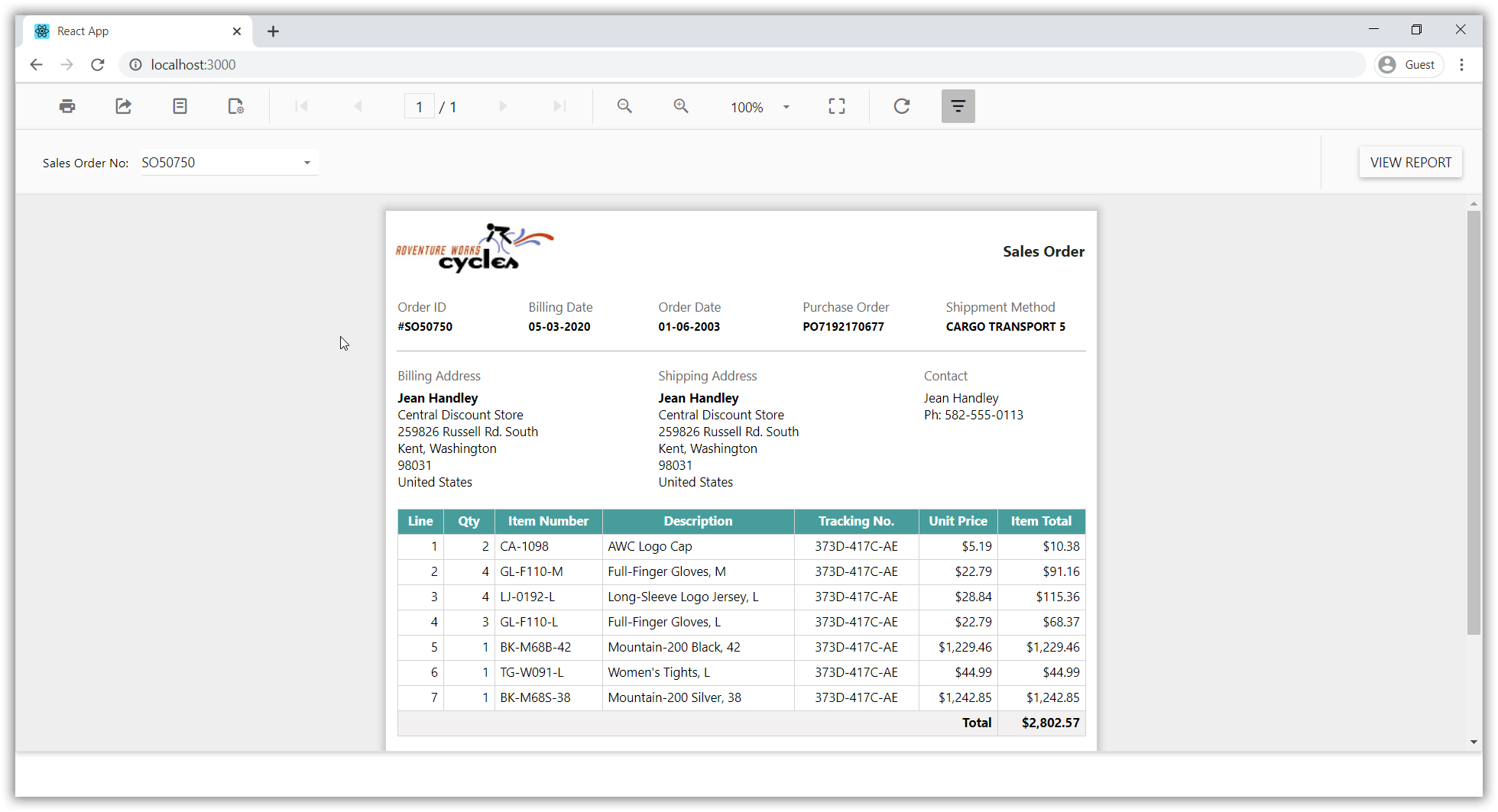
Deploying the application in production
To deploy the application in production, run the following command at the command prompt, which will create a folder named build to generate the build files.
npm run buildFrequently asked questions
Which npm package do I install for the React Report Viewer?
Install @boldreports/react-reporting-components@latest for React versions greater than 16, or @boldreports/[email protected] for React 16 or earlier. Also install the create-react-class package.
Does the React Report Viewer need a Web API service?
Yes. The Bold Reports® React Report Viewer requires a Web API service to process data and file actions. You can use the online Web API services or create an ASP.NET or ASP.NET Core Web API service.
Why do I configure webpack in the React Boilerplate application?
Bold Reports® uses cur type files, so you configure the webpack url-loader plugin in internals/webpack/webpack.base.babel.js to load them.