Embed Bold Reports® Report Server Designer
You can embed classic Report Designer with Report Server to create, edit, browse and publish reports using the Report Server built-in API service.
Follow this steps to integrate Report Server with Bold Reports® Designer version less than
v5.2.xx
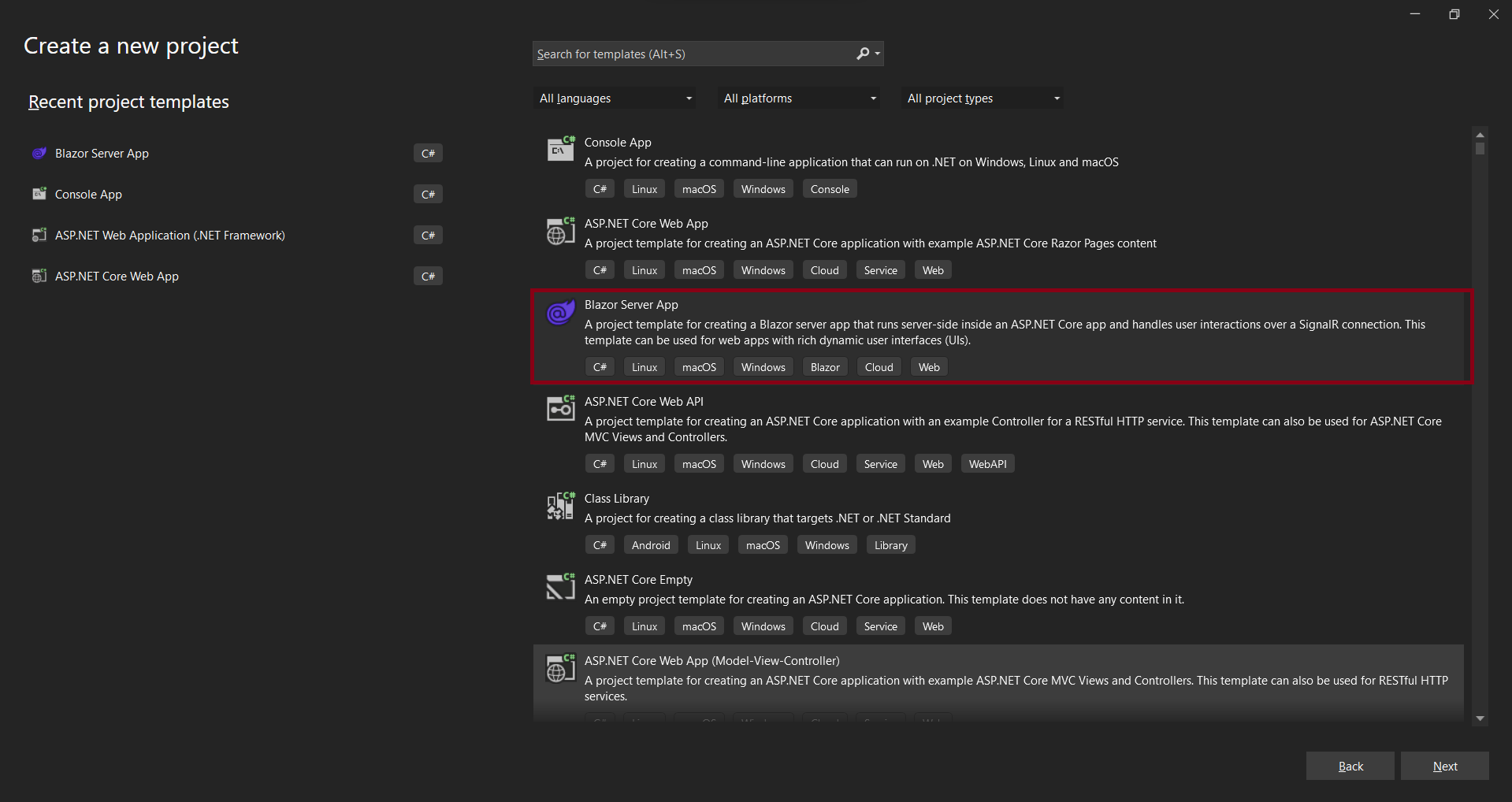
To get started, create a Blazor Server App template application and name it BlazorReportingTools using Visual Studio 2022. If this template is not available for you, refer to this link to configure the system environment.
To get started quickly with classic Report designer, you can check this video:
Create Blazor Server application
-
Start Visual Studio 2022 and click Create new project.
-
Choose Blazor Server App, and then click Next.
-
Change the project name, and then click Next.
-
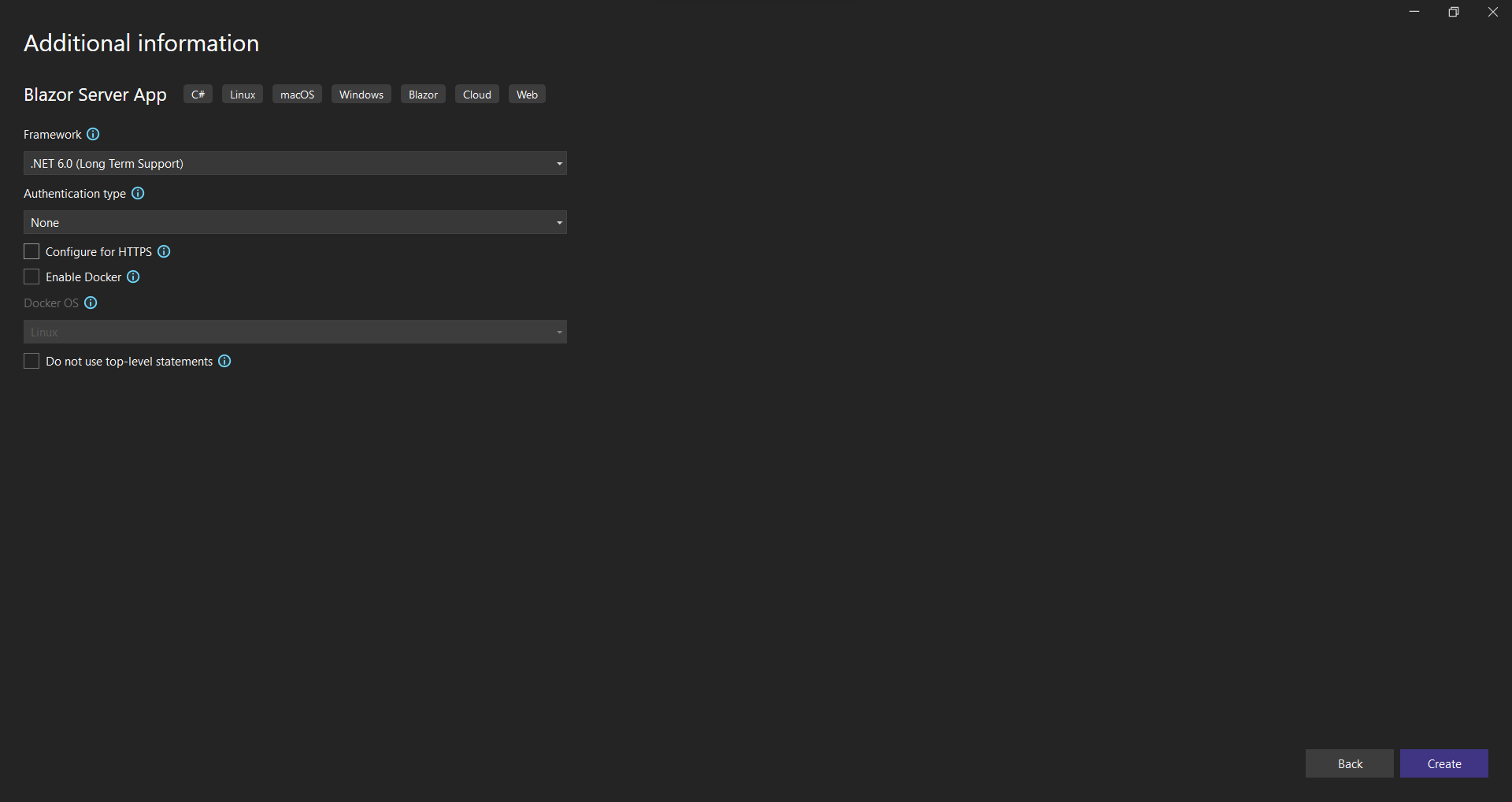
Select Blazor server app, and then click Create
Refer scripts and CSS
Directly refer all the required scripts and style sheets from CDN links.
-
Reference the following online CDN links along with the
boldreports-interop.jsinterop file in the head section ofPages/_Host.cshtmlto use our JavaScript reporting controls in the Blazor application.<link href="https://cdn.boldreports.com/12.2.6/content/material/bold.reports.all.min.css" rel="stylesheet" /> <link href="https://cdn.boldreports.com/12.2.6/content/material/bold.reportdesigner.min.css" rel="stylesheet" /> <link href="https://cdnjs.cloudflare.com/ajax/libs/codemirror/5.37.0/codemirror.min.css" rel="stylesheet" /> <link href="https://cdnjs.cloudflare.com/ajax/libs/codemirror/5.37.0/addon/hint/show-hint.min.css" rel="stylesheet" /> <script src="https://cdn.boldreports.com/external/jquery-1.10.2.min.js" type="text/javascript"></script> <script src="https://cdn.boldreports.com/external/jsrender.min.js" type="text/javascript"></script> <script src="https://cdnjs.cloudflare.com/ajax/libs/codemirror/5.37.0/codemirror.min.js" type="text/javascript"></script> <script src="https://cdnjs.cloudflare.com/ajax/libs/codemirror/5.37.0/addon/hint/show-hint.min.js" type="text/javascript"></script> <script src="https://cdnjs.cloudflare.com/ajax/libs/codemirror/5.37.0/addon/hint/sql-hint.min.js" type="text/javascript"></script> <script src="https://cdnjs.cloudflare.com/ajax/libs/codemirror/5.37.0/mode/sql/sql.min.js" type="text/javascript"></script> <script src="https://cdnjs.cloudflare.com/ajax/libs/codemirror/5.37.0/mode/vb/vb.min.js" type="text/javascript"></script> <!--Used to render the gauge item. Add this script only if your report contains the gauge report item. --> <script src="https://cdn.boldreports.com/12.2.6/scripts/common/ej2-base.min.js"></script> <script src="https://cdn.boldreports.com/12.2.6/scripts/common/ej2-data.min.js"></script> <script src="https://cdn.boldreports.com/12.2.6/scripts/common/ej2-pdf-export.min.js"></script> <script src="https://cdn.boldreports.com/12.2.6/scripts/common/ej2-svg-base.min.js"></script> <script src="https://cdn.boldreports.com/12.2.6/scripts/data-visualization/ej2-lineargauge.min.js"></script> <script src="https://cdn.boldreports.com/12.2.6/scripts/data-visualization/ej2-circulargauge.min.js"></script> <!--Used to render the map item. Add this script only if your report contains the map report item.--> <script src="https://cdn.boldreports.com/12.2.6/scripts/data-visualization/ej2-maps.min.js"></script> <script src="https://cdn.boldreports.com/12.2.6/scripts/common/bold.reports.common.min.js"></script> <script src="https://cdn.boldreports.com/12.2.6/scripts/common/bold.reports.widgets.min.js"></script> <script src="https://cdn.boldreports.com/12.2.6/scripts/common/bold.report-designer-widgets.min.js"></script> <!--Used to render the chart item. Add this script only if your report contains the chart report item.--> <script src="https://cdn.boldreports.com/12.2.6/scripts/data-visualization/ej.chart.min.js"></script> <!-- Report Designer component script--> <script src="https://cdn.boldreports.com/12.2.6/scripts/bold.report-viewer.min.js"></script> <script src="https://cdn.boldreports.com/12.2.6/scripts/bold.report-designer.min.js"></script> <!-- Blazor interop file --> <script src="~/scripts/boldreports-interop.js"></script>
Report Server Configuration to design the report
The Report Designer requires the serviceAuthorizationToken, serviceUrl, and reportServerUrl to perform the API actions with Bold Report Server. You can provide the information from Report Server, as shown in the following explained manner.
serviceUrl– Report Server Reporting Service information should be provided for this API.reportServerUrl- Report Server Reporting Server information should be provided for this API.serviceAuthorizationToken– Authorization token to communicate with serviceUrl.
Initialize Report Designer
-
Create a
Data/BoldReportOptions.csclass with the following code to hold the RDL report designer properties.[Data/BoldReportOptions.cs]namespace BlazorReportingTools.Data { public class RenderReportDesigner { public string ServiceURL { get; set; } public string ServerURL { get; set; } public string AuthorizationToken { get; set; } } } -
Create a
boldreports-interop.jsfile inside thewwwroot/scriptsfolder and use the following code snippet to invoke the Bold Report Designer JavaScript control.// Interop file to render the Bold Report designer component with properties. window.BoldReports = { RenderDesigner: function (elementID, reportDesignerOptions) { $("#" + elementID).boldReportDesigner({ serviceUrl: reportDesignerOptions.serviceURL, reportServerUrl: reportDesignerOptions.serverURL, serviceAuthorizationToken: reportDesignerOptions.authorizationToken }); } } -
Open a
index.razorpage. Remove existing codes and add the following codes@page "/" @using Microsoft.JSInterop @using Microsoft.AspNetCore.Components @inject IJSRuntime JSRuntime @using BlazorReportingTools.Data; <div id="report-designer" style="width: 100%;height: 950px"></div> @code { // Reportdesigner options RenderReportDesigner designerOptions = new RenderReportDesigner(); // Used to render the Bold Report designer component in Blazor page. public async void RenderReportDesigner() { await JSRuntime.InvokeVoidAsync("BoldReports.RenderDesigner", "report-designer", designerOptions); } // Initial rendering of Bold Report designer protected override void OnAfterRender(bool firstRender) { RenderReportDesigner(); } }
If you need to know the difference between
reportServiceUrlandreportServerUrl, refer to the Difference between Report Service URL and Report Server URL.
You can follow one of the procedure from below based on your Report Server type,
Enterprise Reporting Server
-
Generate token with your user credentials and assign it to serviceAuthorizationToken. You can refer to the documentation here, to generate the token by using credentials.
public async void RenderReportDesigner()
    {
        designerOptions.AuthorizationToken = "bearer <server-token>";
        await JSRuntime.InvokeVoidAsync("BoldReports.RenderDesigner", "report-designer", designerOptions);
    }
You can refer to the documentation here on how to generate the token within an application.
-
Set the Bold Report Server built-in service URL to the
report-service-urlproperty. Thereport-service-urlproperty value should be in format ofhttps://<<Report server name>>/reporting/reportservice/api/designer.public async void RenderReportDesigner() { designerOptions.ServiceURL = "https://<your-report-server-domain>/reporting/reportservice/api/Designer"; designerOptions.AuthorizationToken = "bearer <server-token>"; await JSRuntime.InvokeVoidAsync("BoldReports.RenderDesigner", "report-designer", designerOptions); } -
Set the Bold Report Server built-in server URL to the
report-server-urlproperty. Thereport-server-urlproperty value should be in format ofhttps://<<Report server name>>/reporting/api/site/<<site name>>.public async void RenderReportDesigner() { designerOptions.ServiceURL = "https://<your-report-server-domain>/reporting/reportservice/api/Designer"; designerOptions.ServerURL = "https://<your-report-server-domain>/reporting/api/site/<site-name>"; designerOptions.AuthorizationToken = "bearer <server-token>"; await JSRuntime.InvokeVoidAsync("BoldReports.RenderDesigner", "report-designer", designerOptions); }
Cloud Reporting server
-
Generate token with your user credentials and assign it to serviceAuthorizationToken. You can refer the documentation here, to generate the token by using credentials.
public async void RenderReportDesigner()
    {
        designerOptions.AuthorizationToken = "bearer <server-token>";
        await JSRuntime.InvokeVoidAsync("BoldReports.RenderDesigner", "report-designer", designerOptions);
    }
You can refer to the documentation here on how to generate the token within an application.
-
Set the Bold Report Server built-in service URL to the
report-service-urlproperty. Thereport-service-urlproperty value is ahttps://service.boldreports.com/api/designer.public async void RenderReportDesigner() { designerOptions.ServiceURL = "https://service.boldreports.com/api/Designer"; designerOptions.AuthorizationToken = "bearer <server-token>"; await JSRuntime.InvokeVoidAsync("BoldReports.RenderDesigner", "report-designer", designerOptions); } -
Set the Bold Report Server built-in server URL to the
report-server-urlproperty. Thereport-server-urlproperty value should be in format ofhttps://<<Report server name>>/reporting/api/.public async void RenderReportDesigner() { designerOptions.ServiceURL = "https://service.boldreports.com/api/Designer"; designerOptions.ServerURL = "https://<your-report-server-domain>/reporting/api/"; designerOptions.AuthorizationToken = "bearer <server-token>"; await JSRuntime.InvokeVoidAsync("BoldReports.RenderDesigner", "report-designer", designerOptions); }