Add Classic Web Report Designer in Blazor application
This section explains the steps required to add classic web Report Designer to a Blazor application.
Follow this getting started section to embedded Bold Reports® Designer version less than
v5.2.xx.
To get start quickly with Report Designer, you can check on this video:
Prerequisites
Before getting started with classic bold web report designer, make sure your development environment includes the following requirements.
- Visual Studio 2019 with ASP.NET and Web Development workloads.
- .NET Core 3.1 Framework.
Create a Blazor application
To get started, create a Blazor Server App template application and name it BlazorReportingTools using Visual Studio 2019. If this template is not available for you, refer this link to configure the system environment.
The source code for this Blazor reporting components app is available on GitHub.
Create a Web API for report designing
In this section, we are going to create a Web API controller that will be used to process the designer file and data actions.
-
Install the following NuGet packages in the created Blazor application. These are used for processing the RDL reports.
Package Purpose BoldReports.Net.Core Creates Web API service to process the designer file and data actions. System.Data.SqlClient Should be referenced in the project when the RDL report renders visual data from the SQL Server or SQL Azure data source based on the RDL design. The package version should be higher than 4.1.0. Microsoft.AspNetCore.Mvc.NewtonsoftJson ASP.NET Core MVC features that use `Newtonsoft.Json`. Includes input and output formatter for JSON and JSON Patch. The package version should be higher than 3.1.2. -
Create an empty API controller by right-clicking the
Datafolder, choosingAdd --> Controller, and then naming itBoldReportsAPIController.cs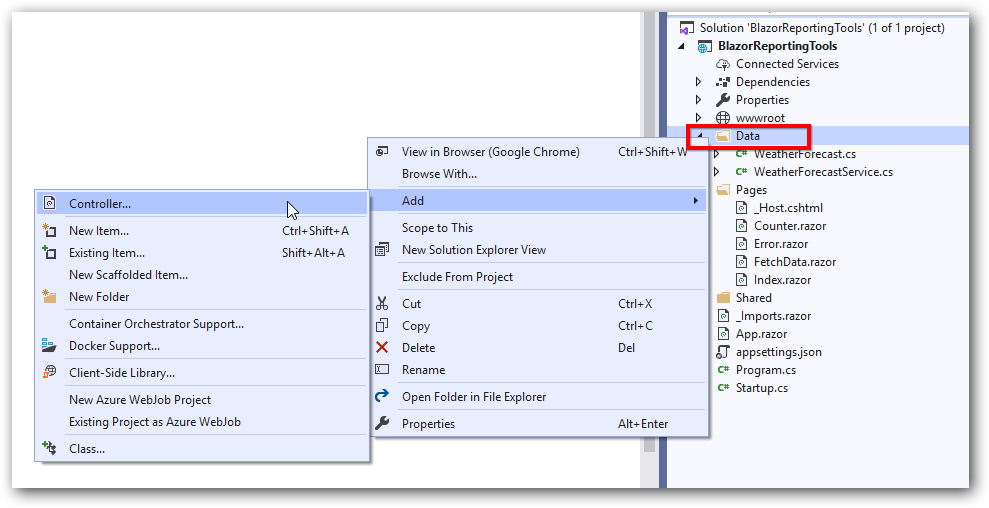
-
We are going to implement the
IReportDesignerControllerinterface from the namespaceBoldReports.Web.ReportDesignerwhich contains the required actions and helper methods declaration to process the designer file and data actions. TheReportDesignerHelperandReportHelperclass contains methods that help to processPostorGetrequest from the control and return the response. Refer to the following code sample.using BoldReports.Web.ReportViewer; using Microsoft.AspNetCore.Hosting; using BoldReports.Web.ReportDesigner; using Microsoft.Extensions.Caching.Memory; namespace BlazorReportingTools.Data { [Route("api/{controller}/{action}/{id?}")] public class BoldReportsAPIController : ControllerBase, IReportDesignerController { private Microsoft.Extensions.Caching.Memory.IMemoryCache _cache; private IWebHostEnvironment _hostingEnvironment; public BoldReportsAPIController(Microsoft.Extensions.Caching.Memory.IMemoryCache memoryCache, IWebHostEnvironment hostingEnvironment) { _cache = memoryCache; _hostingEnvironment = hostingEnvironment; } /// <summary> /// Get the path of specific file /// </summary> /// <param name="itemName">Name of the file to get the full path</param> /// <param name="key">The unique key for report designer</param> /// <returns>Returns the full path of file</returns> [NonAction] private string GetFilePath(string itemName, string key) { string rootPath = this._hostingEnvironment.WebRootPath ? this._hostingEnvironment.WebRootPath : this._hostingEnvironment.ContentRootPath; string dirPath = Path.Combine(rootPath, "Cache", key); if (!System.IO.Directory.Exists(dirPath)) { System.IO.Directory.CreateDirectory(dirPath); } return Path.Combine(dirPath, itemName); } /// <summary> /// Action (HttpGet) method for getting resource of images in the report. /// </summary> /// <param name="key">The unique key for request identification.</param> /// <param name="image">The name of requested image.</param> /// <returns>Returns the image as HttpResponseMessage content.</returns> public object GetImage(string key, string image) { return ReportDesignerHelper.GetImage(key, image, this); } /// <summary> /// Send a GET request and returns the requested resource for a report. /// </summary> /// <param name="resource">Contains report resource information.</param> /// <returns> Resource object for the given key</returns> public object GetResource(ReportResource resource) { return ReportHelper.GetResource(resource, this, _cache); } /// <summary> /// Report Initialization method that is triggered when report begin processed. /// </summary> /// <param name="reportOptions">The ReportViewer options.</param> [NonAction] public void OnInitReportOptions(ReportViewerOptions reportOption) { //You can update report options here } /// <summary> /// Report loaded method that is triggered when report and sub report begins to be loaded. /// </summary> /// <param name="reportOptions">The ReportViewer options.</param> [NonAction] public void OnReportLoaded(ReportViewerOptions reportOption) { //You can update report options here } /// <summary> /// Action (HttpPost) method for posting the request for designer actions. /// </summary> /// <param name="jsonData">A collection of keys and values to process the designer request.</param> /// <returns>Json result for the current request.</returns> [HttpPost] public object PostDesignerAction([FromBody] Dictionary<string, object> jsonResult) { return ReportDesignerHelper.ProcessDesigner(jsonResult, this, null, this._cache); } /// <summary>Action (HttpPost) method for posting the request for designer actions.</summary> /// <returns>Json result for the current request.</returns> public object PostFormDesignerAction() { return ReportDesignerHelper.ProcessDesigner(null, this, null, this._cache); } public object PostFormReportAction() { return ReportHelper.ProcessReport(null, this, this._cache); } /// <summary> /// Action (HttpPost) method for posting the request for report process. /// </summary> /// <param name="jsonResult">The JSON data posted for processing report.</param> /// <returns>The object data.</returns> [HttpPost] public object PostReportAction([FromBody] Dictionary<string, object> jsonResult) { return ReportHelper.ProcessReport(jsonResult, this, this._cache); } /// <summary> /// Sets the resource into storage location. /// </summary> /// <param name="key">The unique key for request identification.</param> /// <param name="itemId">The unique key to get the required resource.</param> /// <param name="itemData">Contains the resource data.</param> /// <param name="errorMessage">Returns the error message, if the write action is failed.</param> /// <returns>Returns true, if resource is successfully written into storage location.</returns> [NonAction] bool IReportDesignerController.SetData(string key, string itemId, ItemInfo itemData, out string errorMessage) { errorMessage = string.Empty; if (itemData.Data != null) { System.IO.File.WriteAllBytes(this.GetFilePath(itemId, key), itemData.Data); } else if (itemData.PostedFile != null) { var fileName = itemId; if (string.IsNullOrEmpty(itemId)) { fileName = System.IO.Path.GetFileName(itemData.PostedFile.FileName); } using (System.IO.MemoryStream stream = new System.IO.MemoryStream()) { itemData.PostedFile.OpenReadStream().CopyTo(stream); byte[] bytes = stream.ToArray(); var writePath = this.GetFilePath(fileName, key); System.IO.File.WriteAllBytes(writePath, bytes); stream.Close(); stream.Dispose(); } } return true; } /// <summary> /// Gets the resource from storage location. /// </summary> /// <param name="key">The unique key for request identification.</param> /// <param name="itemId">The unique key to get the required resource.</param> /// <returns>Returns the resource data and error message.</returns> [NonAction] public ResourceInfo GetData(string key, string itemId) { var resource = new ResourceInfo(); try { var filePath = this.GetFilePath(itemId, key); if (itemId.Equals(Path.GetFileName(filePath), StringComparison.InvariantCultureIgnoreCase) && System.IO.File.Exists(filePath)) { resource.Data = System.IO.File.ReadAllBytes(filePath); } else { resource.ErrorMessage = "File not found from the specified path"; } } catch (Exception ex) { resource.ErrorMessage = ex.Message; } return resource; } /// <summary> /// Action (HttpPost) method for posted or uploaded file actions. /// </summary> [HttpPost] public void UploadReportAction() { ReportDesignerHelper.ProcessDesigner(null, this, this.Request.Form.Files[0], this._cache); } } } -
To request the report processing unit properly, we changed the router API attribute to include the controller and action names using
[Route("api/{controller}/{action}/{id?}")]. -
To invoke this Web API with the controller and action, include that information in the
endPointrouting in theStartup.csfile.app.UseEndpoints(endpoints => { endpoints.MapControllers(); endpoints.MapBlazorHub(); endpoints.MapFallbackToPage("/_Host"); });
Initialize the Report Designer
In this section, we are going to integrate Bold Reports® JavaScript controls by creating an interop file to initialize the classic report designer with basic parameters.
-
Create a
Data/BoldReportOptions.csclass with the following code to hold the classic report designer properties.[Data/BoldReportOptions.cs]namespace BlazorReportingTools.Data { public class BoldReportDesignerOptions { public string ServiceURL { get; set; } } } -
Create a
boldreports-interop.jsfile inside thewwwroot/scriptsfolder and use the following code snippet to invoke the Bold Report Designer JavaScript control.// Interop file to render the Bold Report Designer component with properties. window.BoldReports = { RenderDesigner: function (elementID, reportDesignerOptions) { $("#" + elementID).boldReportDesigner({ serviceUrl: reportDesignerOptions.serviceURL }); } } -
Reference the following online CDN links along with the
boldreports-interop.jsinterop file in the head section ofPages/_Host.cshtmlto use our JavaScript reporting controls in the Blazor application.<link href="https://cdn.boldreports.com/13.1.26/content/material/bold.reports.all.min.css" rel="stylesheet" /> <link href="https://cdn.boldreports.com/13.1.26/content/material/bold.reportdesigner.min.css" rel="stylesheet" /> <link href="https://cdnjs.cloudflare.com/ajax/libs/codemirror/5.37.0/codemirror.min.css" rel="stylesheet" /> <link href="https://cdnjs.cloudflare.com/ajax/libs/codemirror/5.37.0/addon/hint/show-hint.min.css" rel="stylesheet" /> <script src="https://cdn.boldreports.com/external/jquery-1.10.2.min.js" type="text/javascript"></script> <script src="https://cdn.boldreports.com/external/jsrender.min.js" type="text/javascript"></script> <script src="https://cdnjs.cloudflare.com/ajax/libs/codemirror/5.37.0/codemirror.min.js" type="text/javascript"></script> <script src="https://cdnjs.cloudflare.com/ajax/libs/codemirror/5.37.0/addon/hint/show-hint.min.js" type="text/javascript"></script> <script src="https://cdnjs.cloudflare.com/ajax/libs/codemirror/5.37.0/addon/hint/sql-hint.min.js" type="text/javascript"></script> <script src="https://cdnjs.cloudflare.com/ajax/libs/codemirror/5.37.0/mode/sql/sql.min.js" type="text/javascript"></script> <script src="https://cdnjs.cloudflare.com/ajax/libs/codemirror/5.37.0/mode/vb/vb.min.js" type="text/javascript"></script> <!--Used to render the gauge item. Add this script only if your report contains the gauge report item. --> <script src="https://cdn.boldreports.com/13.1.26/scripts/common/ej2-base.min.js"></script> <script src="https://cdn.boldreports.com/13.1.26/scripts/common/ej2-data.min.js"></script> <script src="https://cdn.boldreports.com/13.1.26/scripts/common/ej2-pdf-export.min.js"></script> <script src="https://cdn.boldreports.com/13.1.26/scripts/common/ej2-svg-base.min.js"></script> <script src="https://cdn.boldreports.com/13.1.26/scripts/data-visualization/ej2-lineargauge.min.js"></script> <script src="https://cdn.boldreports.com/13.1.26/scripts/data-visualization/ej2-circulargauge.min.js"></script> <!--Used to render the map item. Add this script only if your report contains the map report item.--> <script src="https://cdn.boldreports.com/13.1.26/scripts/data-visualization/ej2-maps.min.js"></script> <script src="https://cdn.boldreports.com/13.1.26/scripts/common/bold.reports.common.min.js"></script> <script src="https://cdn.boldreports.com/13.1.26/scripts/common/bold.reports.widgets.min.js"></script> <script src="https://cdn.boldreports.com/13.1.26/scripts/common/bold.report-designer-widgets.min.js"></script> <!--Used to render the chart item. Add this script only if your report contains the chart report item.--> <script src="https://cdn.boldreports.com/13.1.26/scripts/data-visualization/ej.chart.min.js"></script> <!-- Report Designer component script--> <script src="https://cdn.boldreports.com/13.1.26/scripts/bold.report-viewer.min.js"></script> <script src="https://cdn.boldreports.com/13.1.26/scripts/bold.report-designer.min.js"></script> <!-- Blazor interop file --> <script src="~/scripts/boldreports-interop.js"></script> -
Inject IJSRuntime and invoke this JavaScript interop with the created
BoldReportsAPIURL in thePages/Index.razorfile to design the report using our designer.[Pages/Index.razor]@page "/" @using Microsoft.JSInterop @using Microsoft.AspNetCore.Components @inject IJSRuntime JSRuntime @using BlazorReportingTools.Data; <div id="designer" style="width: 100%;height: 950px"></div> @code { // ReportDesigner options BoldReportDesignerOptions designerOptions = new BoldReportDesignerOptions(); // Used to render the Bold Report Designer component in Blazor page. public async void RenderReportDesigner() { designerOptions.ServiceURL = "/api/BoldReportsAPI"; await JSRuntime.InvokeVoidAsync("BoldReports.RenderDesigner", "designer", designerOptions); } // Initial rendering of Bold Report Designer protected override void OnAfterRender(bool firstRender) { RenderReportDesigner(); } }
Here we created and used BoldReportDesignerOptions to pass the parameters for report designer. In the future, if we need any additional parameters, we can just include them in the BoldReportsOptions.cs file.
Run the Application
Click Run or F5 button to launch the application.
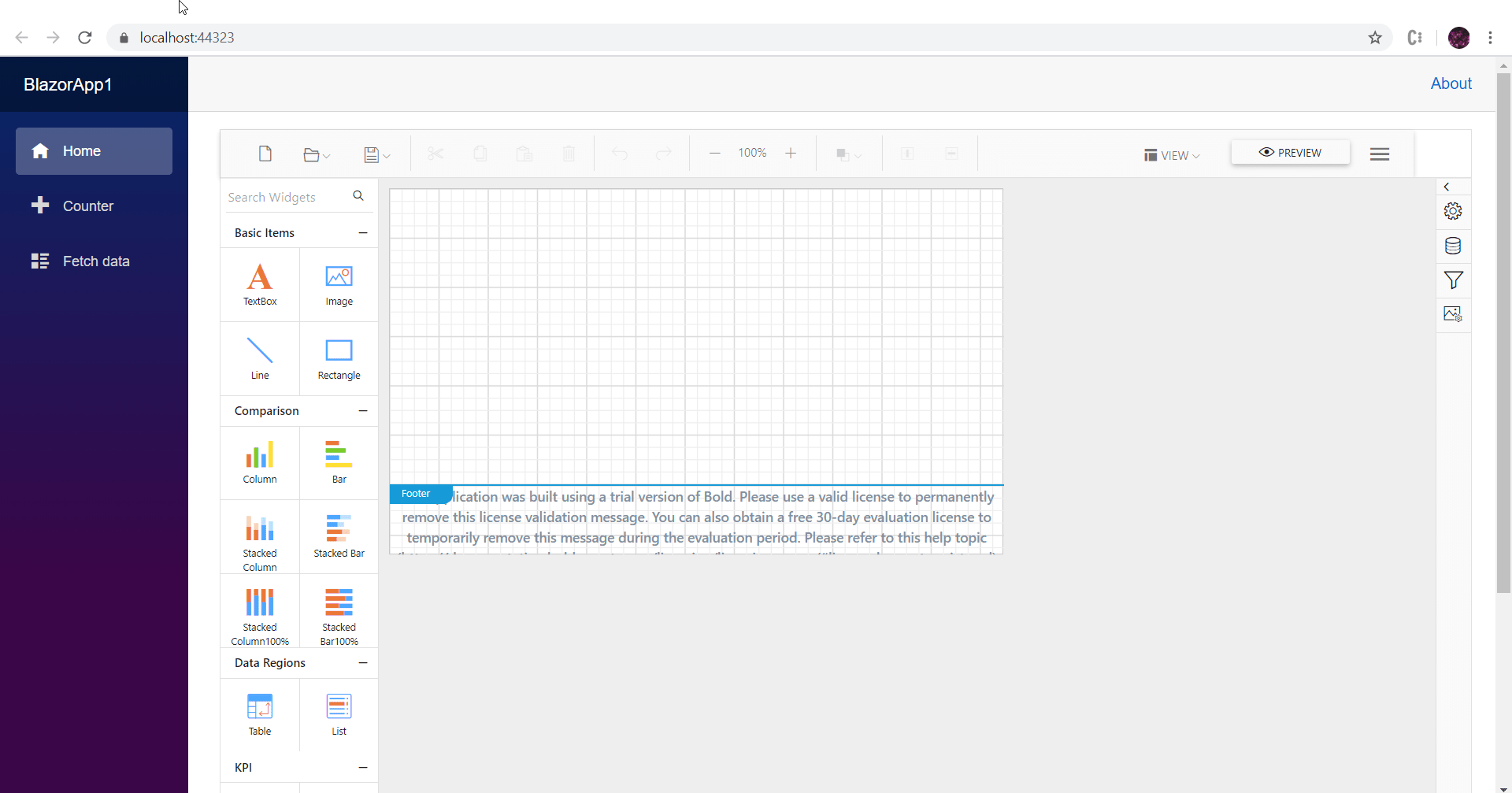
Note: You can refer to our feature tour page for the Blazor Report Designer to see its innovative features. Additionally, you can view our Blazor Report Designer examples which demonstrate the rendering of SSRS RDLC and RDL reports.