Configure email settings for Bold Data Hub mail alerts
Bold Data Hub in Bold Reports® sends pipeline mail alerts through the SMTP settings you configure in the Email settings section of the Settings tab.
Note: Sender mail configuration is mandatory if mail alerting needs to be enabled.
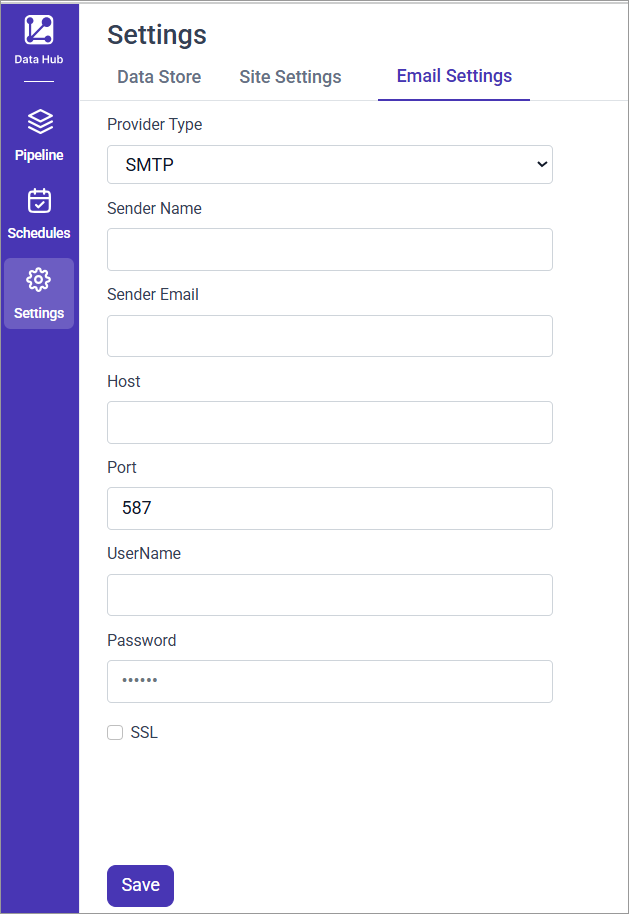
The following screenshot shows the Email settings section in the Bold Data Hub Settings tab.
SMTP Configuration Fields
Bold Data Hub uses the following SMTP fields to send pipeline mail alerts:
| Field | Description |
|---|---|
| Provider Type | Select the email service provider. Currently supports SMTP. |
| Sender Name | Name displayed as the sender in the recipient’s inbox. |
| Sender Email | The email address used to send notifications. |
| Host | The SMTP server host (e.g., smtp.gmail.com, smtp.office365.com). |
| Port | Port used for SMTP transmission. Typically 587 for TLS. |
| UserName | SMTP username (usually the same as the sender email address). |
| Password | App-specific password if using MFA/2FA. |
| SSL | Enable this option if your provider requires SSL instead of TLS. |
TLS vs SSL: Port
587typically uses STARTTLS, while port465uses SSL. Choose the correct port and SSL setting based on your provider.
When do I need an app password?
Bold Data Hub needs an app password in the Password field when multi-factor authentication (MFA) is enabled on the sender account.
- For a Google account with MFA, generate an App Password from your Google Account.
- For a Microsoft account with MFA, generate an App Password from your Microsoft Account.
How do I save the SMTP configuration?
Bold Data Hub stores your SMTP settings when you save them from the Email settings section.
- Fill in all required fields.
- Select the SSL option if your provider requires it.
- Click Save.
A confirmation message appears near the Save button when the provided credentials are correct.
SMTP needs to be configured only once. These settings are reused for all pipelines with mail alerting enabled.
How do I choose who receives pipeline alerts?
Bold Data Hub sets email recipients for pipeline alerts in the Schedule tab. See Mail Alert settings for Bold Data Hub schedules.
Frequently asked questions
Do I have to configure SMTP for every pipeline?
No. You configure SMTP in Bold Data Hub only once, and the settings are reused for all pipelines with mail alerting enabled.
Which port should I use for SMTP?
Port 587 typically uses STARTTLS, while port 465 uses SSL. Choose the port and SSL setting that your provider requires.