Connect Microsoft (Bing) Ads with Bold Data Hub
The Microsoft (Bing) Ads connector in Bold Data Hub loads data from Microsoft Advertising (formerly Bing Ads) into a Bold Reports® data source. Microsoft Advertising is a platform for creating and managing ads across the Microsoft Search Network.
What credentials do I need for Microsoft (Bing) Ads?
The Bold Data Hub Microsoft (Bing) Ads connector needs a Microsoft Advertising account with API access and a Microsoft Entra ID (formerly Azure AD) application for OAuth.
Get Developer Token
You get the developer token for Bold Data Hub from Microsoft Advertising.
- Sign in to Microsoft Advertising.
- Go to Tools > Developer Token.
- Request and copy your Developer Token.
Register a Microsoft Entra ID Application (Client ID and Secret)
You register a Microsoft Entra ID application in the Azure portal to get the client ID and client secret for Bold Data Hub.
-
Go to the Azure portal.

-
Navigate to Microsoft Entra ID (formerly Azure Active Directory) > App registrations > New registration.
-
Name the app, choose supported account types, and set a redirect URI (for example,
https://localhostor your app’s redirect URL). -
After creating the app, copy the Application (client) ID.
-
Go to Certificates & secrets > New client secret. Copy the Client Secret value.
Find Customer ID and Account ID
You find the Customer ID and Account ID for Bold Data Hub in the Microsoft Advertising UI. Use the account switcher or the Account settings page to copy the numeric Customer ID and Account ID.
Connection Properties
The Microsoft (Bing) Ads connector in Bold Data Hub reads the following properties from the config section of a YAML file:
Connectorname: Bing Ads
Client_id: Azure AD Application (client) ID
Client_secret: Azure AD client secret
Developer_token: Microsoft Advertising Developer Token
Customer_id: Microsoft Advertising Customer ID
Account_id: Microsoft Advertising Account ID
How does incremental mode work for reports?
The Microsoft (Bing) Ads reporting endpoints support date-based incremental loads in Bold Data Hub. In the provided template, reports are aggregated Daily and can use either a predefined date window or a custom date range.
Key options used by the template:
  type: reports
  report: Campaign Performance
  aggregation: 'Daily'
  ReportTimeZone: 'PacificTimeUSCanadaTijuana'
  # Use ONE of the following time options:
  PredefinedTime: 'LastSevenDays'   # predefined window
  # OR
  # CustomDateRangeStart: 'YYYY-MM-DD'
# CustomDateRangeEnd: 'YYYY-MM-DD'Notes:
- Include at least one dimension column (for example, TimePeriod, CampaignId, CampaignName). Without a dimension, the API rejects the query.
- Use PredefinedTime for rolling windows or CustomDateRangeStart/End for fixed windows.
Example Configuration
The following Bold Data Hub YAML template shows a complete Microsoft (Bing) Ads extractor configuration:
version: 1.0.1
encrypt_credentials: false
direct_target_import: false
union_all_tables: true
add_dbname_column: false
direct_load_to_destination: true
use_snake_casing: true
plugins:
  extractors:
    - name: Bingads
      connectorname: Bing Ads
      config:
        access_token: <ACCESS_TOKEN>
        refresh_token: <REFRESH_TOKEN>
        client_id: <CLIENT_ID>
        client_secret: <CLIENT_SECRET>
        developer_token: <DEVELOPER_TOKEN>
        customer_id: <CUSTOMER_ID>
        account_id: <ACCOUNT_ID>
      properties:
        type: reports
        report: Campaign Performance
        columns: Clicks, AverageCpc, Spend, Impressions, CampaignId
        aggregation: 'Daily'
        ReportTimeZone: 'PacificTimeUSCanadaTijuana'
        # Choose ONE date option:
        PredefinedTime: 'LastSevenDays'
        # CustomDateRangeStart: '2025-09-01'
        # CustomDateRangeEnd:   '2025-09-30'
        # At least one dimension is required:
How do I connect Microsoft (Bing) Ads in Bold Data Hub?
You connect Microsoft (Bing) Ads by creating a pipeline in Bold Data Hub and authenticating the Bing Ads connector with OAuth.
-
Click the
Bold Data Hubicon on the Navigation Pane.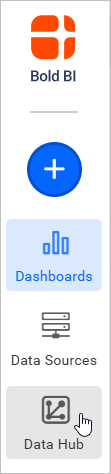
-
Click
Add Pipelineand enter a name for the new pipeline.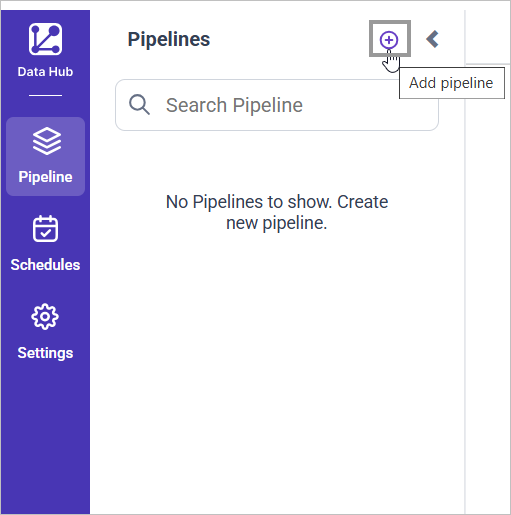
-
Double-click the Bing Ads connector. An Authentication Setup window opens.

-
Enter the Client ID and Client Secret and click Ok.
-
Click Allow in the authorization window to accept the scopes requested by Bold DataHub.
-
Update the developer token and IDs in the template. Adjust the columns and date window as needed, then save to the Bold Reports® Data Store.

Creating a pipeline in Bold Data Hub automatically creates a data source in Bold Reports®. The Bold Reports® data source is a live data source to the destination database used in Bold Data Hub.

Which reports does the template include?
The Bold Data Hub Microsoft (Bing) Ads template includes the Campaign Performance report with Daily aggregation.
- Campaign Performance (Daily aggregation)
- You can add other performance reports similarly (for example, Ad Group Performance, Ad Performance, Keyword Performance) by changing properties.report and selecting valid columns for that report.
How do I schedule the Microsoft (Bing) Ads pipeline?
You schedule the Microsoft (Bing) Ads pipeline in Bold Data Hub from the schedules tab, or you run it on demand.
-
To configure interval-based scheduling, click the schedules tab, select the created pipeline, click the schedule icon, and configure the schedule.


-
For an on-demand refresh, click the
Run Nowbutton.
-
Check the schedule history with the history option and the logs.
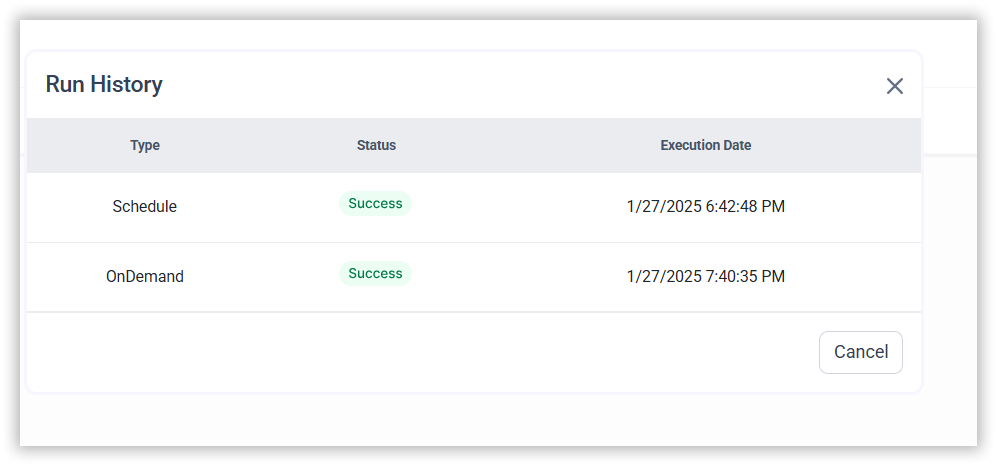
-
Click Logs to see whether the run is completed and the data source is created in Bold Reports®.
-
Click the
Edit DataSourceoption to view the created tables.
Frequently asked questions
Why does the Microsoft Advertising API reject my report query?
The query needs at least one dimension column, such as TimePeriod, CampaignId, or CampaignName. Without a dimension, the API rejects the query.
Can I load a fixed date range instead of a rolling window?
Yes. Use CustomDateRangeStart and CustomDateRangeEnd for fixed windows, or PredefinedTime for rolling windows.
Reference
- Microsoft Advertising API get started guide
- OAuth with Microsoft identity platform (v2)
- Microsoft Advertising developer token
- Microsoft Advertising reports guide
- Register an app in Microsoft Entra ID