Deploy Bold Reports® Evaluation on Docker
The Bold Reports® Evaluation Image is specifically designed to streamline the Bold Reports® evaluation process by integrating a PostgreSQL server within the Bold Reports® container. Please note that this image tag is intended for evaluation purposes only and should not be used in production environments. In this guide, we will demonstrate how to deploy the Bold Reports® evaluation image using Docker Compose, with volume mounts configured for data persistence.
-
Download the Docker Compose file by using the following command.
curl -o docker-compose.yml "https://raw.githubusercontent.com/boldreports/bold-reports-docker/refs/heads/master/deploy/single-container-eval-no-license/docker-compose.yml" -
Run the command below. This command will start the Bold Reports® application container and display the Bold Reports® container logs, providing information about the installation status of the Bold Reports® application.
docker-compose up -d; docker-compose logs -f boldreports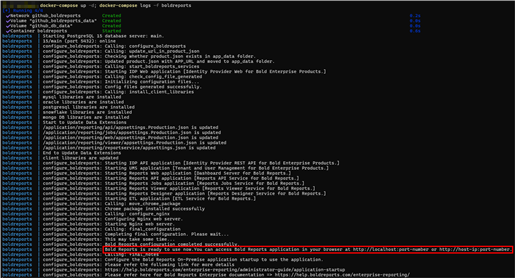
-
Now, access the Bold Reports® application by entering the URL as
http://localhost:8090orhttp://host-ip:8090in the browser. When you open this URL, the application will configure its startup in the background and display the license activation page below within a few seconds. You can either activate your license using the available option or try the trial version by selecting the Proceed with 30 Days Trial option.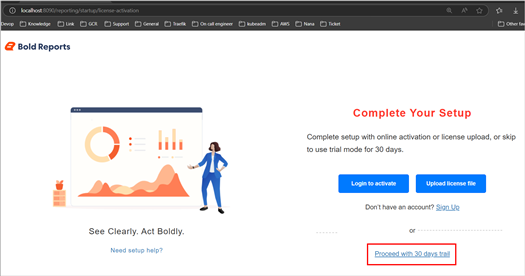
Note: The default port number mentioned in the compose file is 8090. If you are making changes to the port number, then you need to use that port number for accessing the Bold Reports® application.
-
After selecting the license option, the application will redirect you to the dashboard listing page.
Note: 1. The deployment steps above are recommended for evaluation purposes only. For a production use case, you will need to mount the volume to the host path location or online storage and utilize managed DB servers. 2. Don’t use localhost IP (
http://127.0.0.1) withportto access the application.
Shutdown and cleanup
The command docker-compose down removes the containers and default network, but preserves the volumes of Bold Reports® and PostgreSQL.
The command docker-compose down —volumes removes the containers, default network, and all the volumes.